ELAN HC4/HC8 INSTALLATION MANUAL
© ELAN 2010 | All rights reserved.
Page 28
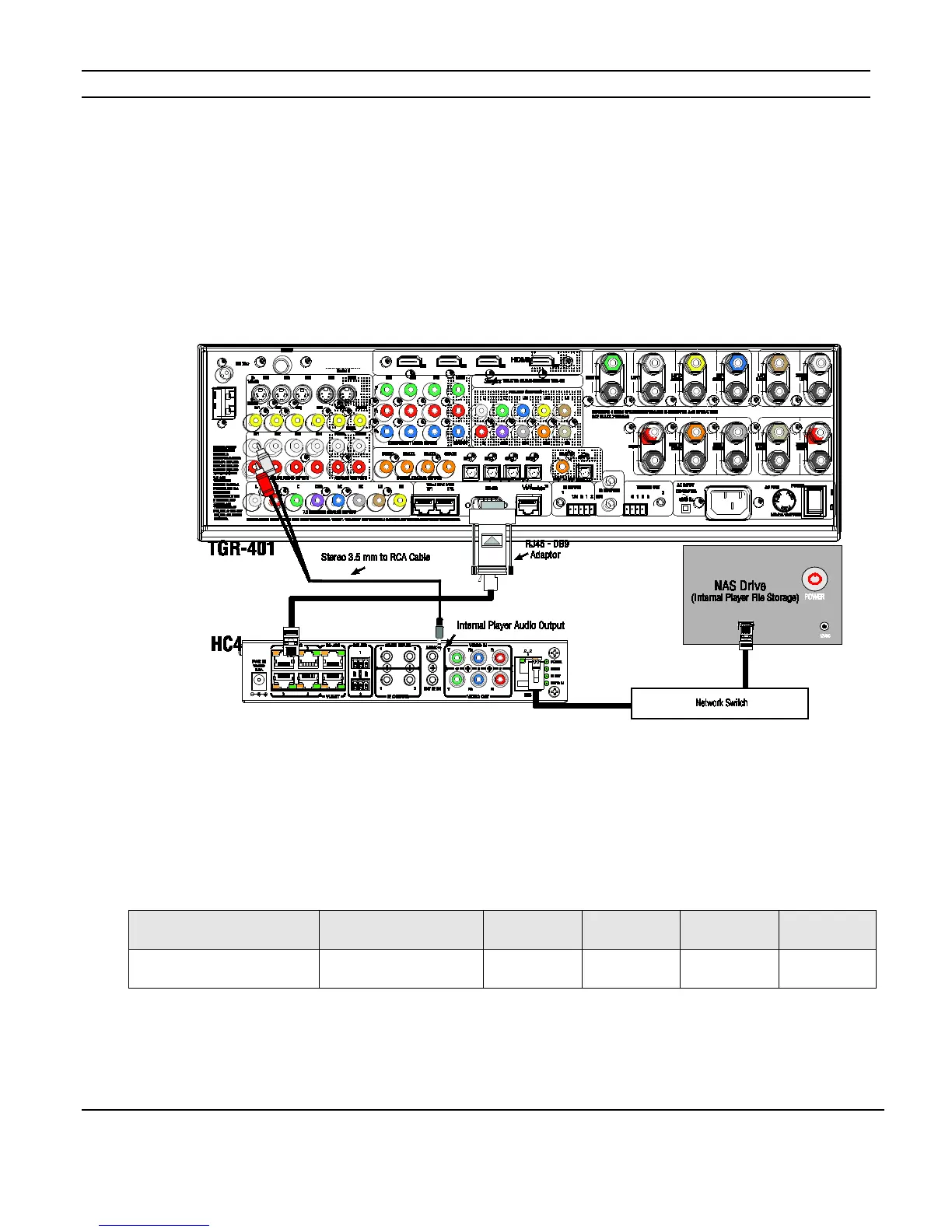
Audio Output Connections
The Internal Player’s Audio Outputs connect to the Source Audio Inputs of the multi-room
controller or Home Theater System just like any analog audio source.
The HC4 has one audio output. The HC8 has two outputs that are independent of each
other and can be treated as two sources. Connect using stereo 3.5 mm to RCA cables as
shown in Figure 3-11.
Figure 3-11: Audio Outputs
Internal Player Capacity
The 500GB internal hard-drive (HC8 only) can be used to store WAV and MP3 audio files
for playback using the Internal Player. Depending on the compression rate of the audio
files, the total storage capacity will vary. The table below provides a general guideline for
storage calculation.
Note: If images used for the picture viewer are also stored on this drive they will impact
the total storage capacity.
Both the HC4 and HC8 can use external NAS drives for file storage.
File Format WAV (Uncompressed) 320kbps 256kbps 192kbps 128kbps
Capacity in Hours 696 1560 4170 4558 8338



 To Next Page