ELAN HC4/HC8 INSTALLATION MANUAL
© ELAN 2010 | All rights reserved.
Page 26
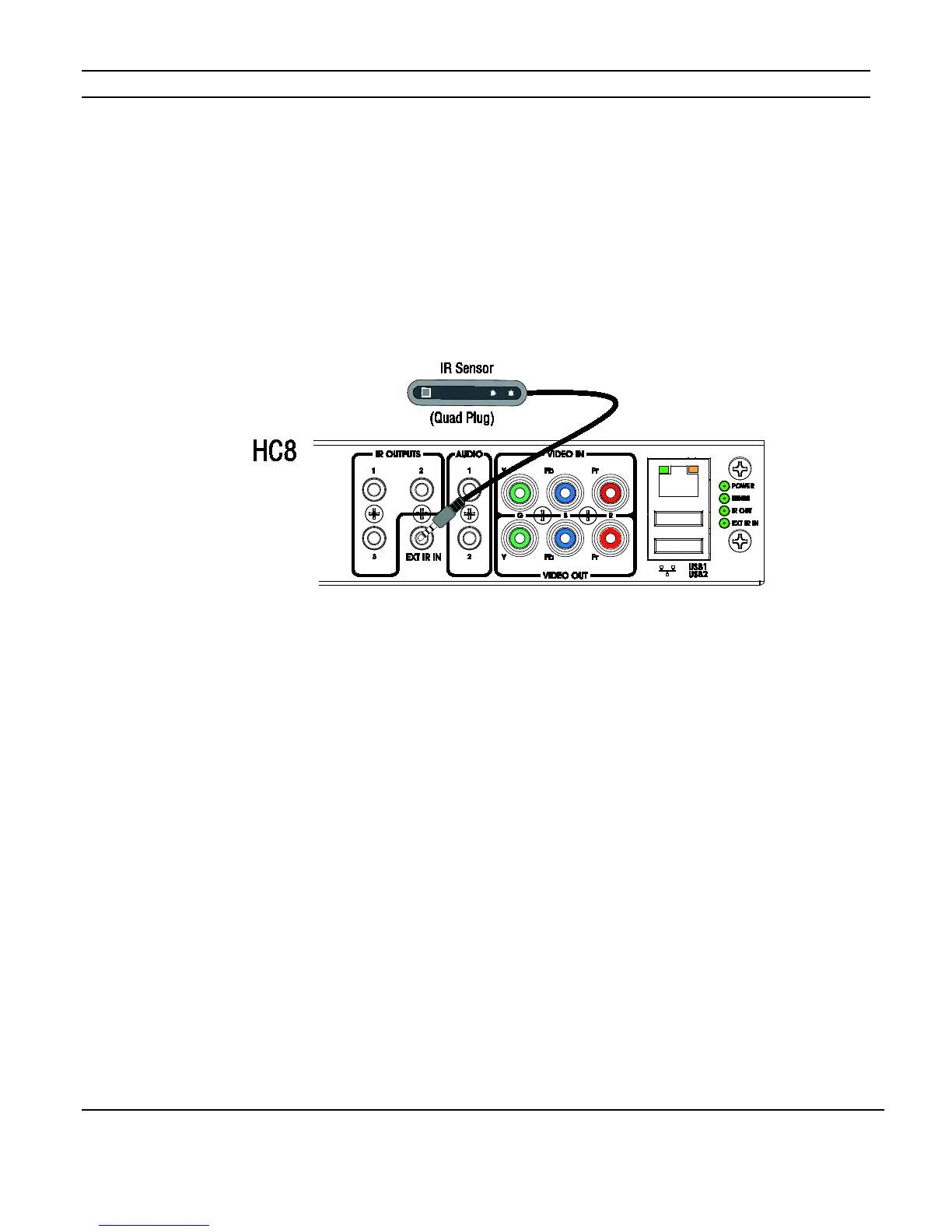
External IR Input Connection
This connection allows the HC4 and HC8 to receive IR input from a Quad plug IR receiver
(as shown in Figure 3-9), from an IR sensor connected to a PPIR Precision Panel (see
pages 41 and 45), or from the PPVN Precision Panel (see page 45). This provides control
of the On Screen Display (OSD) from one IR receiver.
Figure 3-9: External IR Input
Note: When using the External IR Input with an IR receiver directly connected or with an
IR receiver connected to a PPIR Precision panel, the 12VDC power output must be ON in
the configuration software. The factory DEFAULT setting is ON.
Figure 3-10 on the following page shows an HC8 in a can mounted install incorporating
additional IR receivers using Global Caché GC-IREs connected to PPIS precision panels.
The GC-IREs receive IR signals from zone located TS2s connected to the PPVN precision
panel and convert those signals into RS-232 data. The HC4 and HC8 use this RS-232 data
to trigger Event Maps. Event Maps execute commands in response to events detected by
the System Controller.



 To Next Page