20
3.3 Connecting the leads
This section first explains in general how to go about connecting a lead to the LINEARdrive,
and then goes on to describe the specific springcage connectors.
To connect the leads (power, network, LED, etc.):
1. Locate the correct connector for the lead that you wish to connect. The connectors are
clearly marked on the base unit.
2. Strip away the insulation material from the tip of the lead. Refer to the tables in 3.1 “Re-
quired wire sizes” for information on the length of insulation material that you need to
strip away. Stripping away too little insulation material can result in a poor or loose con-
nection.
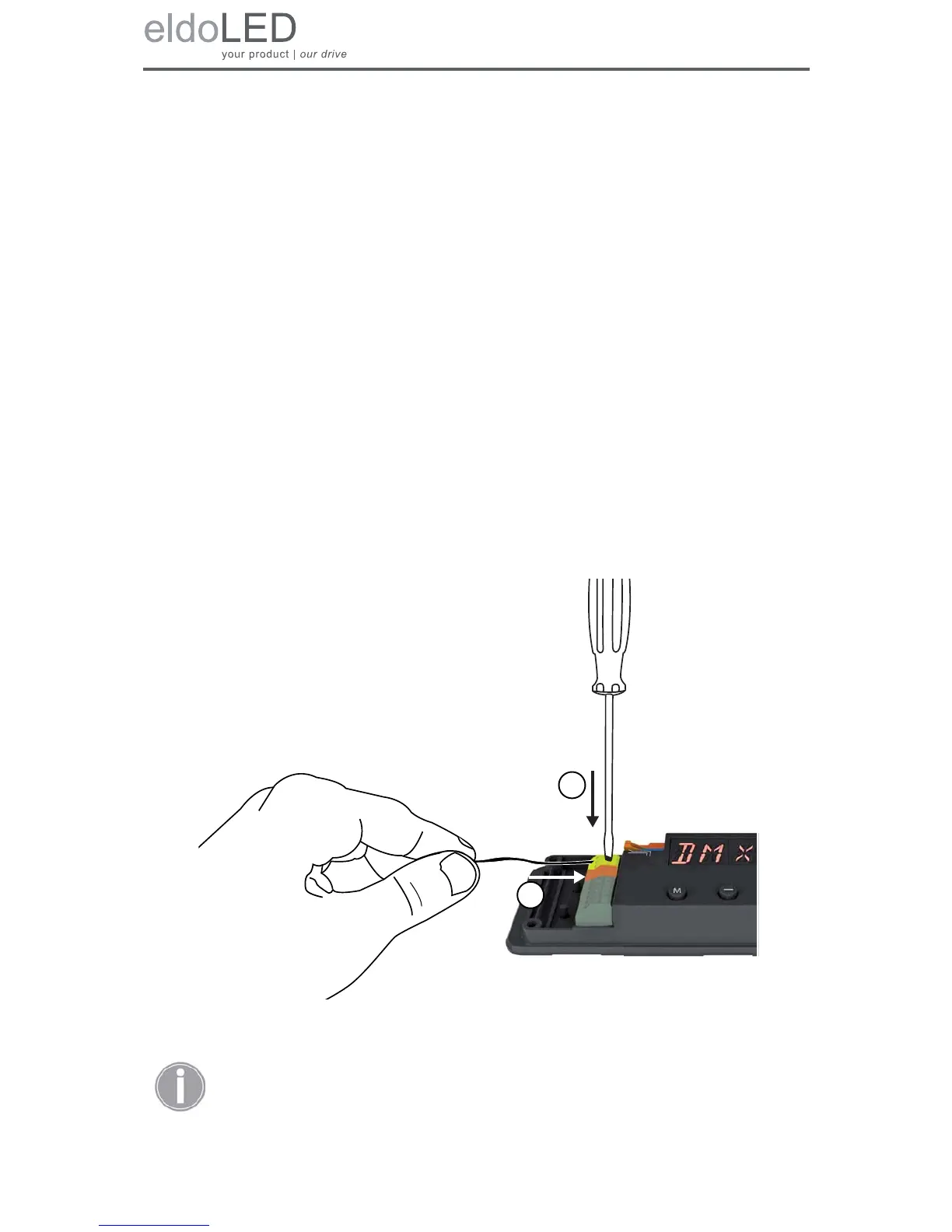
3. Using a small flat screw driver (2mm wide) or your fingernail, push down the top of the
springcage connector.
4. While pressing down the top of the springcage connector, insert the stripped part of
the lead into the connector.
5. Release the top of the springcage connector.
6. Repeat steps 1 through 5 for all leads that you wish to connect.
Figure 3.2: Connecting the leads
The LINEARdrive’s wiring must always meet the requirements of local legis-
lation.



 To Next Page