Installation Information
2-15
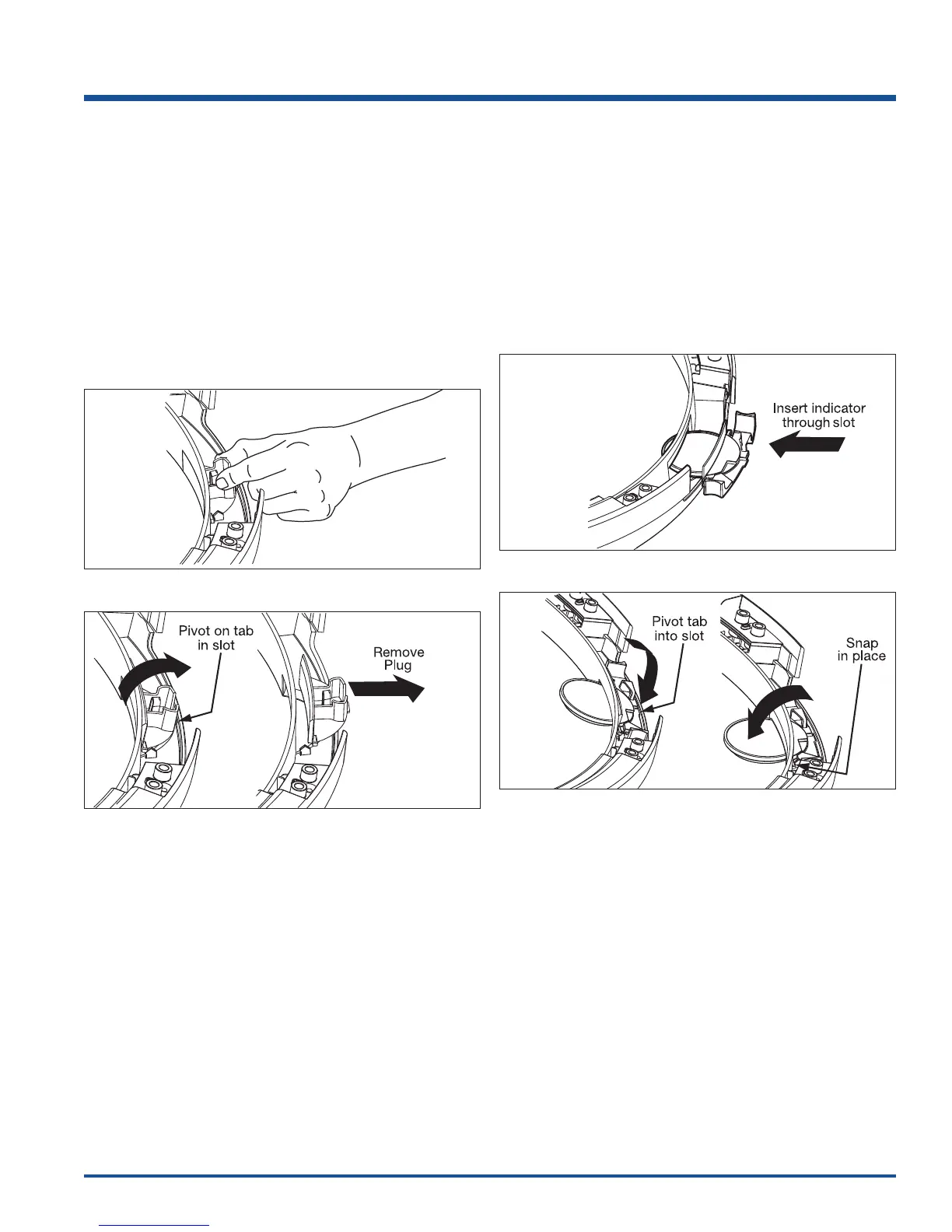
Removing Hole Plug
1. Grasp the hole plug between finger and thumb and
rock it upward, pivoting it away from the center of the
glass, releasing the tab. (See Figure 2-28)
2. Connect the harness to the door lock by inserting it
in the terminal and firmly pushing it in place.
3. Insert the harness connection through the front panel
first, and then pivot the lock until it is flush. Slide the
lock toward the center of the front panel until the
screw holes line up. (See Figure 2-29)
4. Secure the lock with 2 short, course-thread, panhead
screws.
Reinserting Latch Indicator
1. Rotate the latch indicator and move it to the opposite
hole in the door.
2. Grasp the indicator between finger and thumb and
slide it through the opening. (See Figure 2-30)
3. Gently push the indicator toward the center of the
glass and pivot the tab downward into the retaining
slot. (See Figure 2-31)
4. Pivot the indicator downward toward the center of
the glass until it is in place.
Figure 2-28.
Figure 2-29.
Figure 2-30.
Figure 2-31.






 To Next Page