Electronic Control
3-3
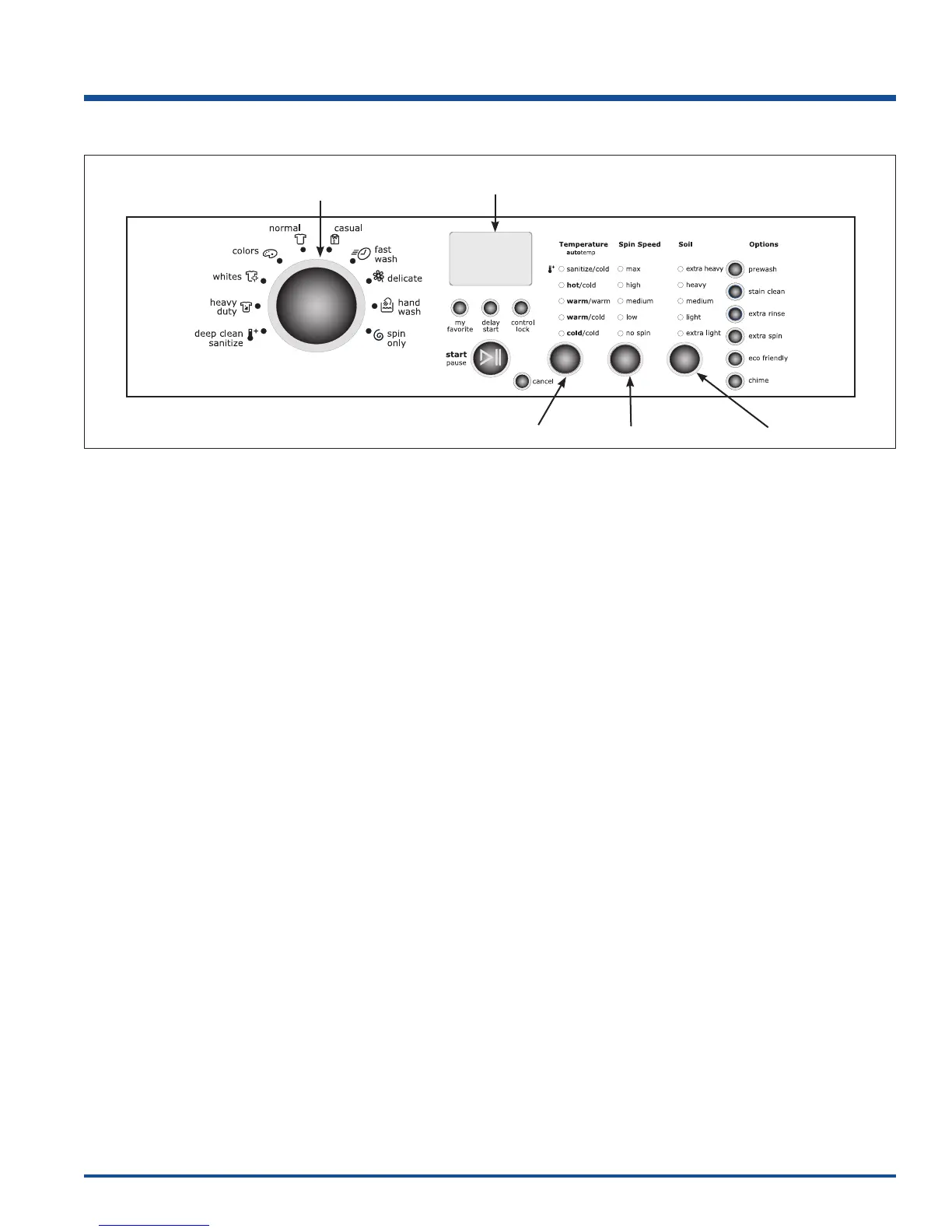
Control Panel (User Interface Layout) IQ-Touch™
Selecting the Appropriate Cycle and Settings Overview
Turn the cycle selector knob in either direction to select the cycle desired. The indicator for that cycle will be
illuminated.
The estimated cycle time, suitable wash and rinse water temperatures, final spin speed, soil level, and options for
each cycle will be indicated for the cycle selected.
To change the settings, press the temperature, spin speed, soil, and options buttons to scroll to the desired settings.
To select or delete an option, press the button for that option. The indicator will light when the option has been
selected. It will no longer be lighted when the option has been deleted.
Adjustments to a cycle will be remembered and recalled each time that cycle is selected in the future.
To return to factory default settings, press and hold the spin speed and soil buttons at the same time for 5 seconds.
Demo Mode
Demo Mode will standby for 10 minutes then perform an LED on/off sequence for 3 minutes. During the standby
sequence the drum light and start button will be activated. The controls will be fully functional during Demo Mode with
abbreviated cycles lasting about 1 minute. Some features will be deactivated during Demo Mode for safety
purposes. When the units are in Demo Mode the text “DEMO MODE” will be displayed in the LCD screen. Demo
mode will be saved if the units are unplugged or if there is a power outage. To deactivate Demo Mode repeat steps
1-3 below.
1. Turn the cycle selector knob to SPIN ONLY cycle, press the START button then the CANCEL button.
2. Activate the controls by turning the cycle selector knob and turn to SPIN ONLY cycle.
3. Press and hold CANCEL button and CTRL LOCK button for 3 seconds
4. DEMO MODE instructions have to be completed by 7 seconds of the control activation.
5. Press the CANCEL button to begin DEMO MODE.
6. To deactivate DEMO MODE repeat steps 1 – 3.
Figure 3-2. IQ-Touch™ Control Panel
Spin Speed Scroll
Temperature Scroll Soil Level Scroll
User Interface
Display
Cycle Selector




 To Next Page