2. The User Interface
iConnect User Manual
13
Flashing Red An alarm has occurred. This alarm
indication is reset when the system is
armed using any of the three arming
methods.
Alarm indication is not displayed after a silent
panic alarm.
Flashing Green Flashing Red You are recording a message.
Display
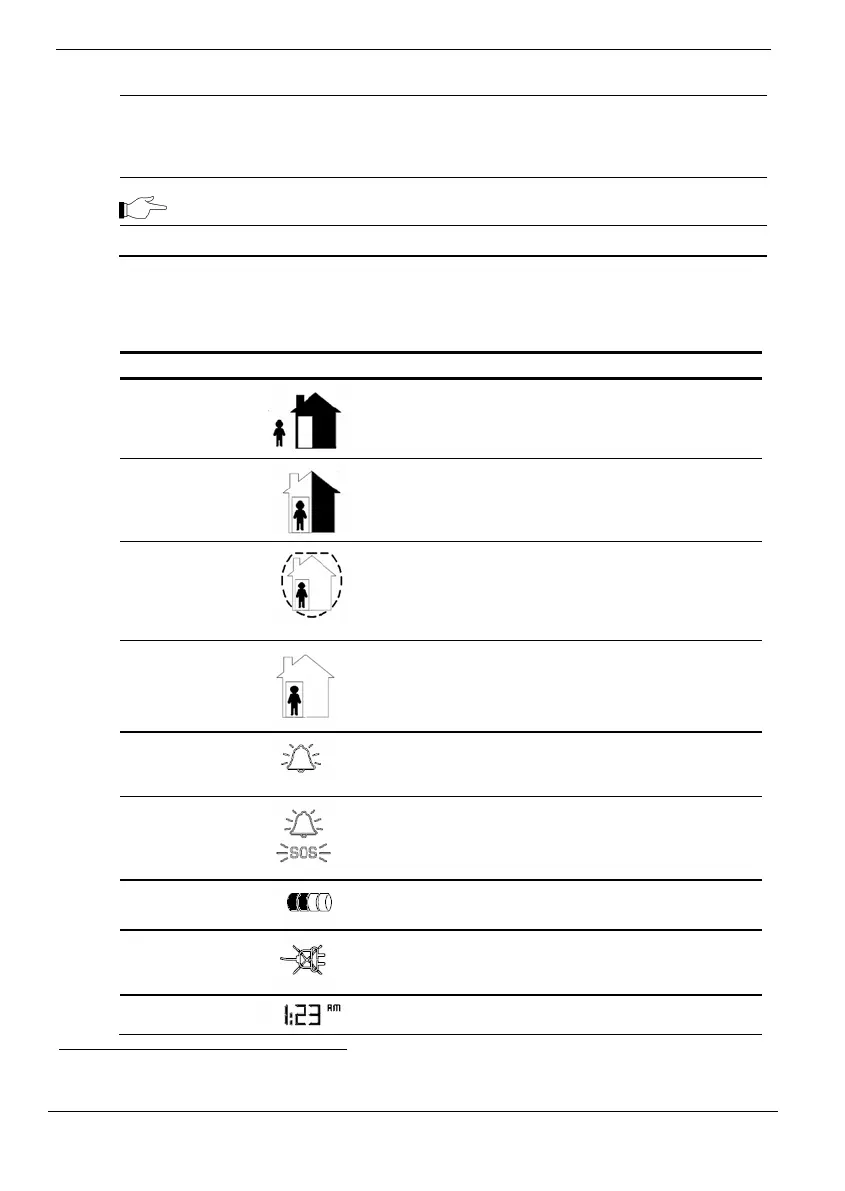
ThefollowingtabledescribestheWirelessTerminaldisplayinterface.
Icon Symbol Description
Full Arm
The system has been armed in Full arm mode.
Full arming is designed for situations where the
house is empty and the entire system is armed
1
.
Part Arm
The system has been armed in Part arm mode.
Part arming is designed for situations where a
specific part of the house is armed and a
separate part of the house is still occupied.
Perimeter
Arm
The system has been armed in Perimeter arm
mode. Perimeter arming is designed for
situations where the occupants are at home and
the perimeter (e.g. doors, windows) is
protected.
Disarm
No arming modes are currently activated. The
icon changes when the Control System has been
armed again.
Alarm
The Alarm icon flashes from the moment an
alarm occurs until the next time the system is
armed.
SOS Panic
Alarm
Indicates that an SOS Panic alarm has been
activated from a Panic zone (typically a Panic
button), a keypad or a keyfob.
Battery
Status
The battery status of the Wireless Terminal.
AC Status
The AC power status of the Wireless Terminal. If
the icon is crossed-out, it means AC power loss
(i.e. the Wireless Terminal is disconnected).
Clock
A four-digit clock display.
1
TheiconshowsallthethreearmingmodesonlywhenarmedfromtheTerminalitself.Ifarmed
fromtheControlSystem,theiconalwaysshowsfullarming.



 To Next Page