3. Arming and Disarming
iConnect User Manual
17
3. Usethemenunavigationbuttons(/)tochoosetherequiredarming
method.
4. Press;theexitdelaybeginstocountdown.Attheendoftheexitdelay,
thesystem/partitionisarmed.
Arming with the Keyfob
Unpartitioned systems
In unpartitioned systems, the default functions for B1 is part arming and for B2
—perimeterarming.
Partitioned systems
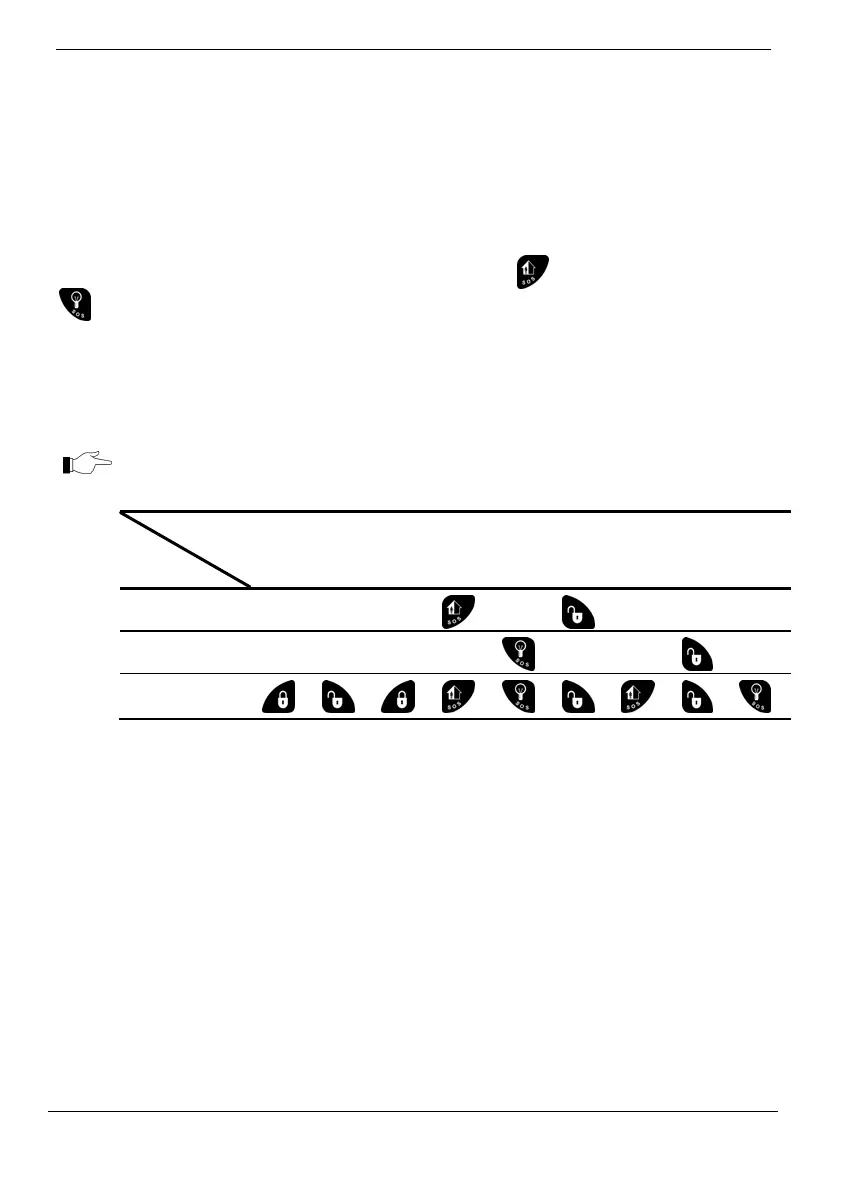
Ifyoursystemispartitioned,eachkeyfobisassignedtoarmanddisarmonepartitionor
thewholesystem.Therefore,keyfobfunctionalityinpartitionedsystemsisdefinedbyits
partitionset(seethetablebelow).
Partitionsetofeachkeyfobisprogrammedbyyourinstaller.
Function
Partition
set
Full
Arm
Disarm the
Whole
System
Arm
P1
Arm
P2
Disarm P1 Disarm P2
P1 only
P2 only
Whole system
(P1 and P2)
→ →
→
Example1:ThekeyfobisassignedtoPartition1.ToArmPartition1,pressB1button.To
disarm Partition 1, press the Disarm button. It is not possible to Full arm/ disarm the
wholesystemortoarm/disarmpartition2withthiskeyfob.
Example2:Thekeyfobisassignedto
bothpartitions.ToArmPartition1,pressB1button.
TodisarmPartition1,presstheDisarmbutton,andthenpressB1.
Combination Arming
Thereisanoptiontoactivatetwoarmingmodessimultaneously.
Unpartitioned Systems
Inunpartitionedsystems,thepossiblecombinationsare:
Full+perimeter
Part+Perimeter



 To Next Page