19
DM-R2170-0002A
www.omnexcontrols.com
call toll free: 1-800-663-8806
Troubleshooting Guide
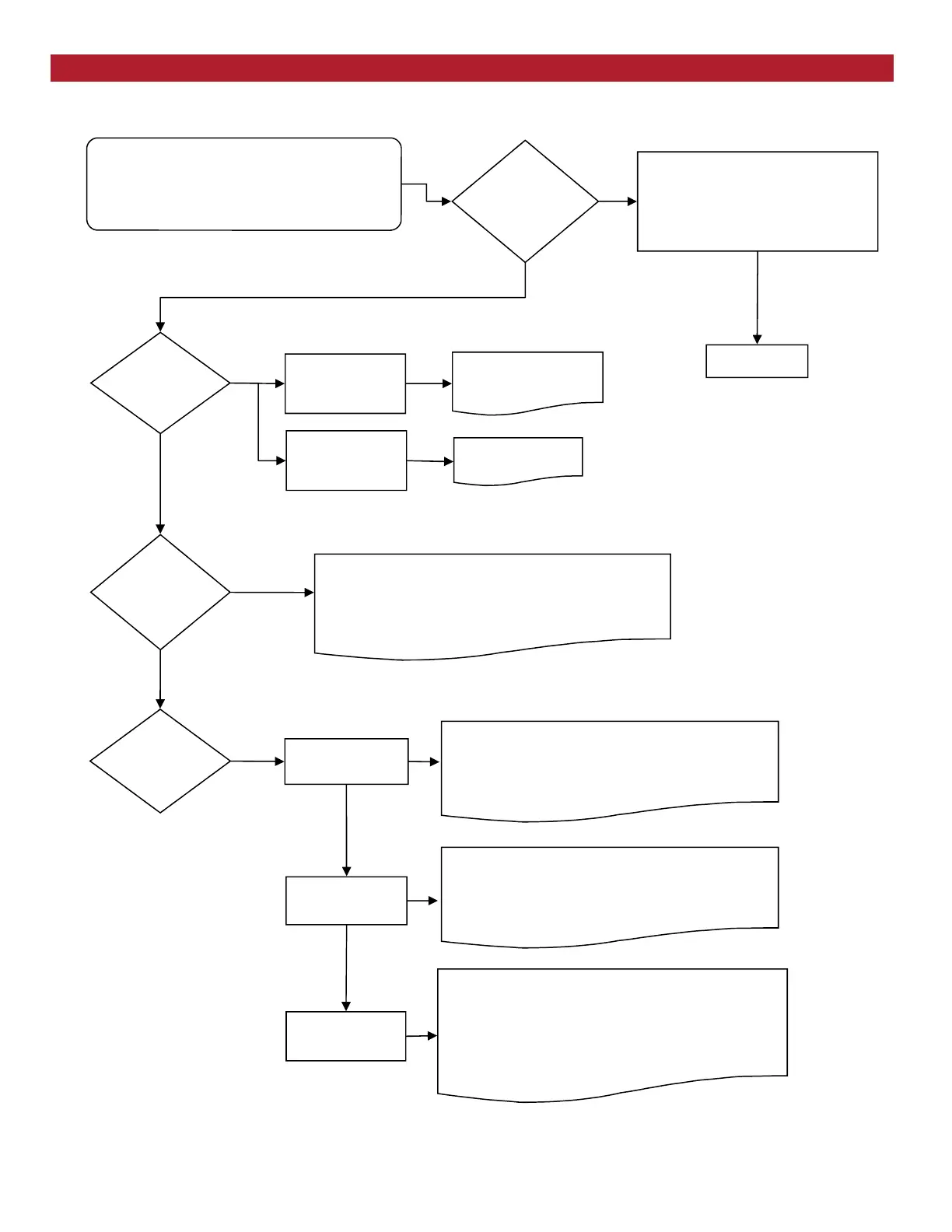
Chart #1
Start
Initial Condition:
Turn transmitter off (all lights are off—press the E-
Stop button)
Cycle power to receiver (turn off and back on)
What is the state
of the lights on the
receiver?
OK state:
Status—GREEN
Link—RED
E-Stop—RED
CAN 1—GREEN
Go to Chart 2
What is the state
of the CAN 1
light ?
Is the Status light
flashing RED?
There are two possible causes:
1. The receiver has no set up information. Proceed with
Download ID procedure
2. If problem is not corrected then there is a CAN soft-
ware error, call for service.
YES
CAN1 light is Solid
GREEN
CAN1 light is
Flashing GREEN
*CAN1 light is
OFF*
Set up Download ID has failed.
Note: This should only occur when the transmitter is on
and the Download ID procedure has been tried. Retry the
Download ID procedure and if condition persists, call for
service.
If the transmitter was never on, call for service
Test the Receiver—R2170
Problem state:
Status—flashing
GREEN
Low battery condition
has been detected
Is the Status light
RED?
Problem state:
EStop—flashing
RED
NO
NO
E-Stop failure
Call for service.
The SW 1 button has been stuck for more than 10 sec-
onds
1. Wiggle the SW 1 button and cycle power to the
receiver
2. If condition persists, call for service
The SW 2 button has been stuck for more than 10 sec-
onds
1. Wiggle the SW 2 button and cycle power to the
receiver
2. If condition persists, call for service
YES



 To Next Page