15
➌ PREPARATION AND CONNECTION
◆SETTING UP
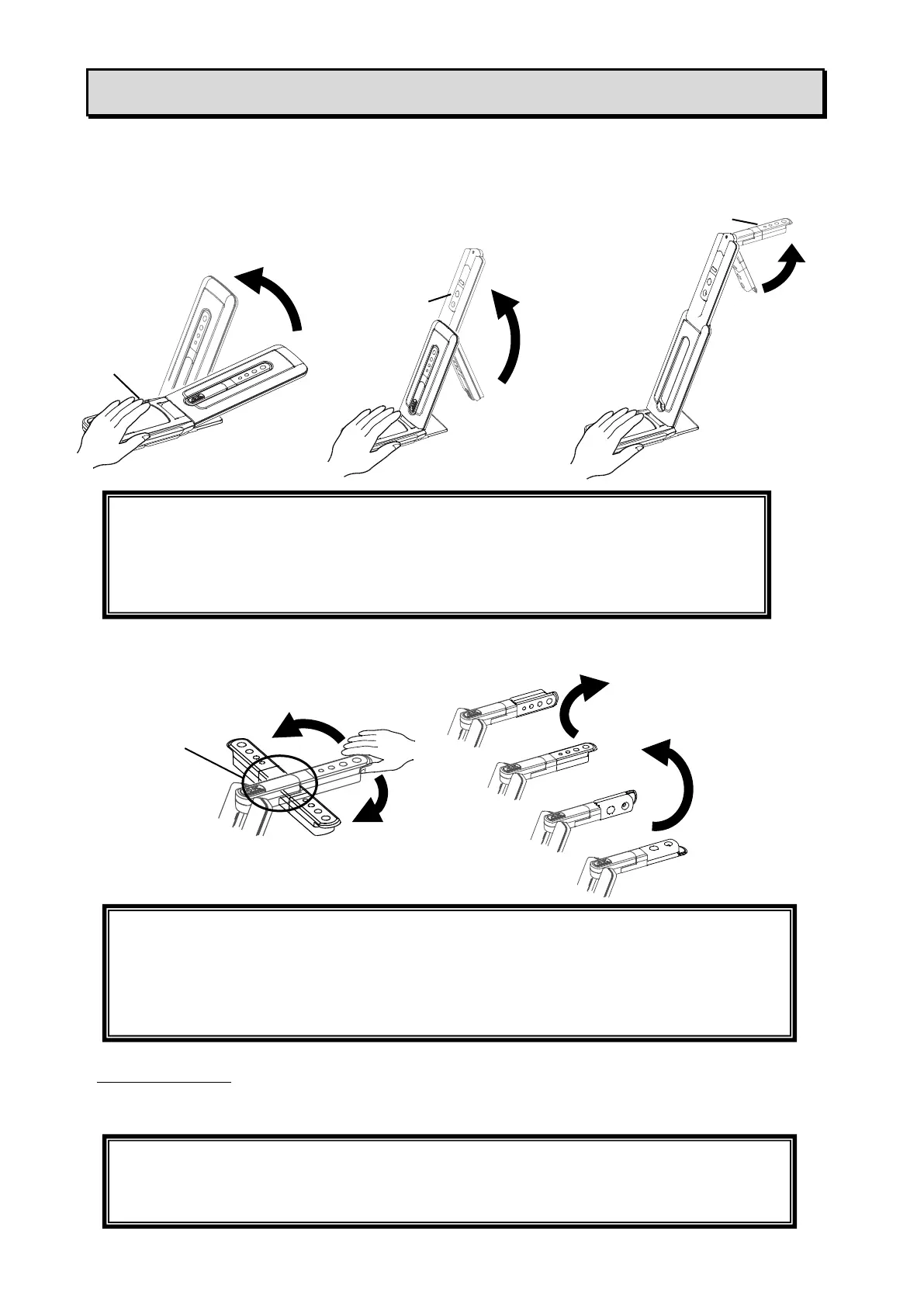
STEP1.Raise the body while holding the operating panel.
STEP2.Raise the arm as indicated by an arrow.
STEP3.Raise the camera head. Set it horizontally.
STEP4.Rotate the camera head according to the shooting direction.
About the magnet
There is a magnet in the bottom of the product. Using the magnet, you can install the product to
various places with metallic surface easily.
CAUTION
・Be careful not to pinch your fingers when moving the arm.
・Do not hold the arm or camera head when carrying the product.
・Be careful not to give an impact to the camera head.
CAUTION
This product uses static electricity sensitive components.
In order to avoid malfunction from static electricity, hold the edge of the camera head to
rotate the camera head.
Do not touch the rotating part.
CAUTION
If the product is installed to the wall or place which is not level with the magnet, it may
fall. Be sure to confirm that the product is installed securely before use.



 To Next Page