Chapter 5 139
Clearing Password Check and BIOS Recovery
This section provide you the standard operating procedures of clearing password and BIOS recovery for
eMachines E732 series. eMachines provides one Hardware Open Gap on the mainboard for clearing password
check, and one Hotkey for enabling BIOS Recovery.
Clearing Password Check
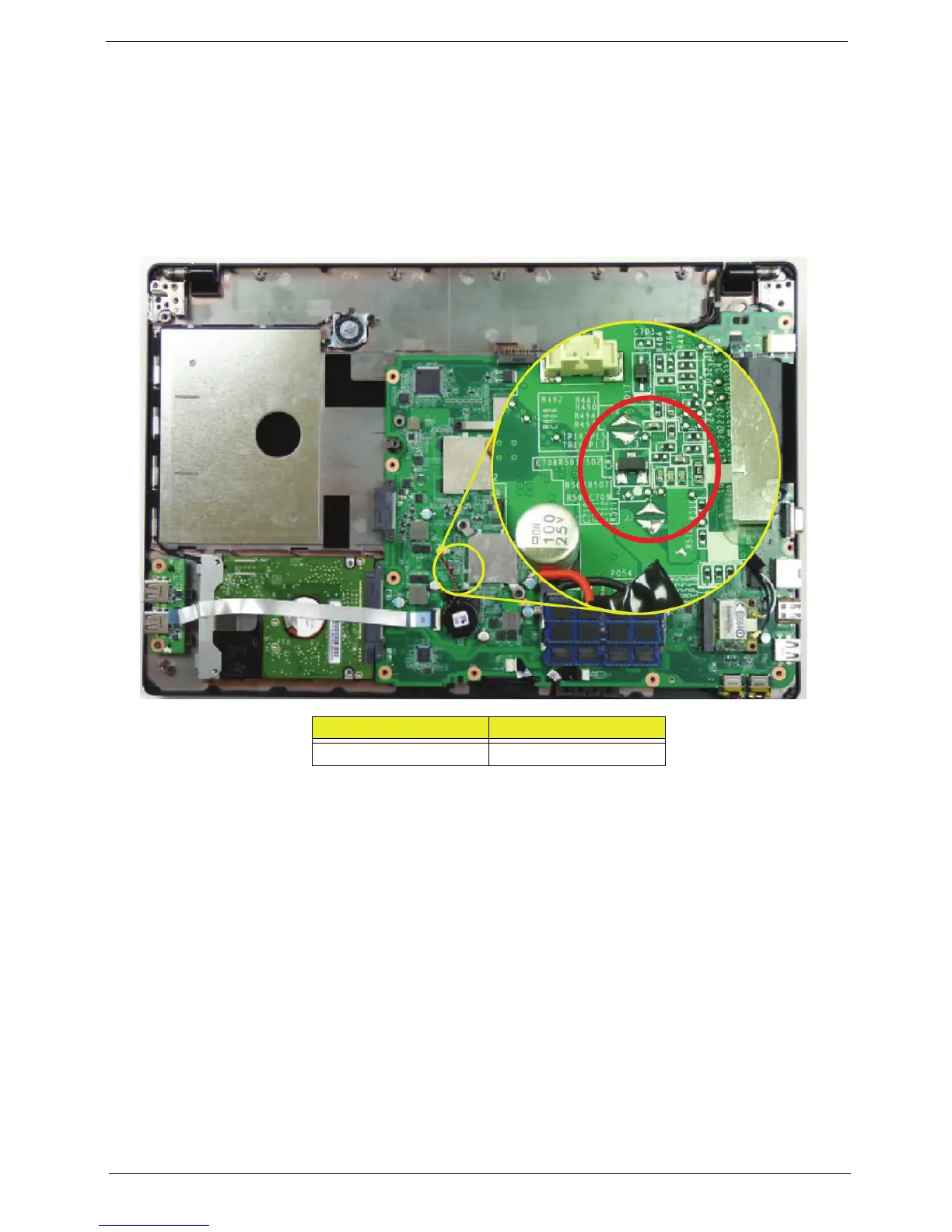
Hardware Open Gap Description is as follows:
Steps for Clearing BIOS Password Check
If users set BIOS Password (Supervisor Password and/or User Password) for a security reason, BIOS will ask
the password during systems POST or when systems enter to BIOS Setup menu. However, once it is
necessary to bypass the password check, users need to short the HW Gap to clear the password by the
following steps:
1. Power Off the system, and remove HDD, AC, Battery and DIMMs from the machine.
2. Open the Bottom Cover of the machine and locate the J1 and J2 jumpers.
3. Use an electric conductivity tool to short the two points of the HW Gap.
4. Plug in AC, keep the short condition on the HW Gap, and press Power Button to power on the system
until BIOS POST is finished. Then remove the tool from the HW Gap.
5. Restart system. Press F2 key to enter BIOS Setup menu.
6. If there is no Password request, BIOS Password is cleared. Otherwise, please follow the steps and try
again.
NOTE: These steps are only for clearing BIOS Password (Supervisor Password and User Password).
Item Description
J1 / J2 Clearn CMOS jumper














 To Next Page