26 • iPro I/O Module Installation and Operation Manual 026-1741 Rev 0
8. Press
(NEXT) to move over to the tab
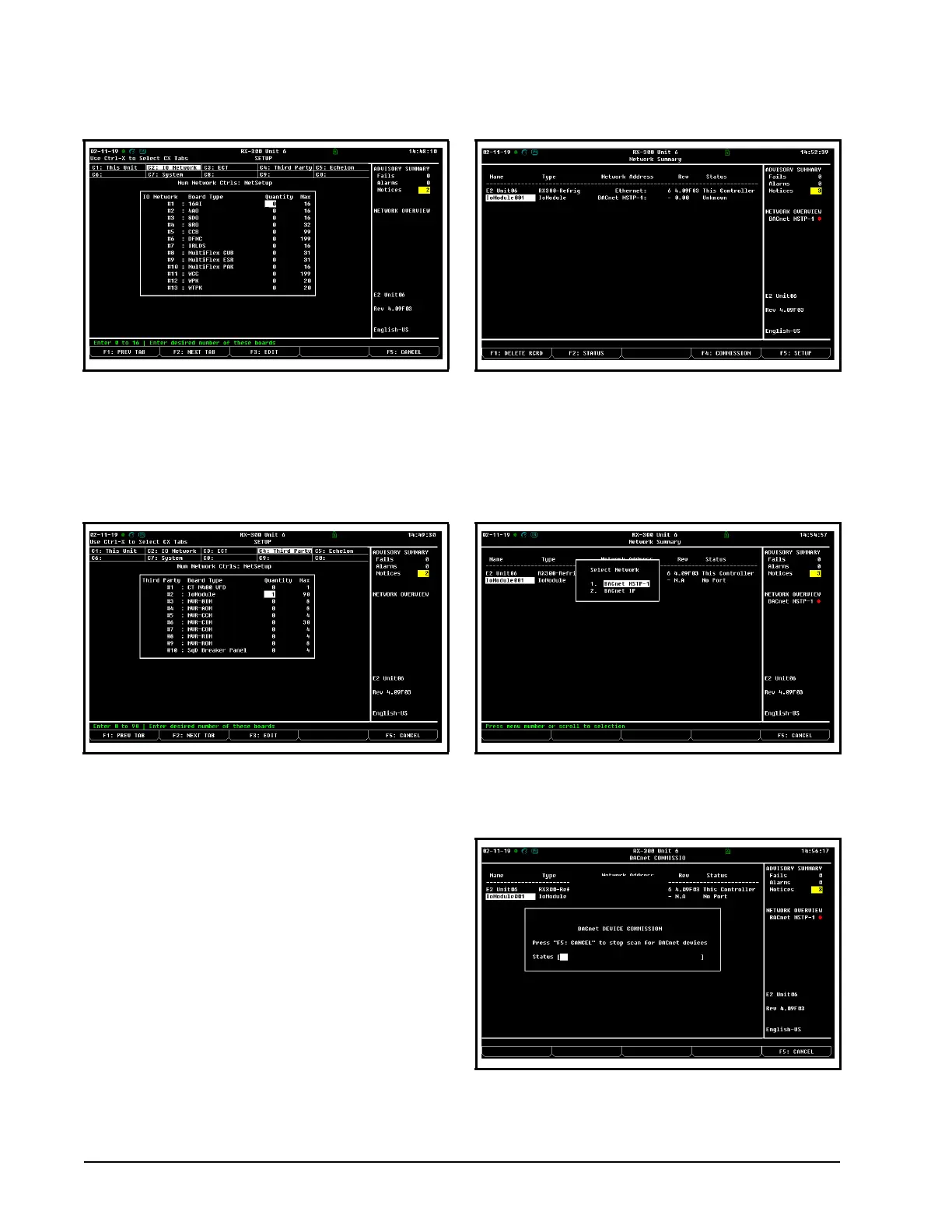
C4: Third Party. In the Connected I/O screen
under the Third Party tab, enter the number of
I/O Module devices on the Quantity field.
9. Press the
key to save and exit.
10. Press
+ at the same time to enter the
Network Summary screen.
11. The number of I/O Module devices added in
Step 3 should now be visible in the Network
Summary screen.
12. Highlight the device and press
COMMISSION, a list of networks will appear.
Select the BACnet MS/TP route assigned to the
Com port earlier in Step 2.
13. E2E will scan for available BACnet MS/TP
devices.
Figure 4-5 - E2E- IO Network Tab
Figure 4-6 - E2E- Third Party Tab
Figure 4-7 - E2E- Network Summary Screen
Figure 4-8 - E2E- Select Network
Figure 4-9 - E2E- BACnet Device Commission


 To Next Page