53
Reference Manual
00809-0100-4021, Rev GC
Section 3: HART commissioning
April 2014
HART® commissioning
Alerts configuration for Hot Backup
Alerts for Hot Backup when configured with first good temperature
Primary sensor failure
Communicator message
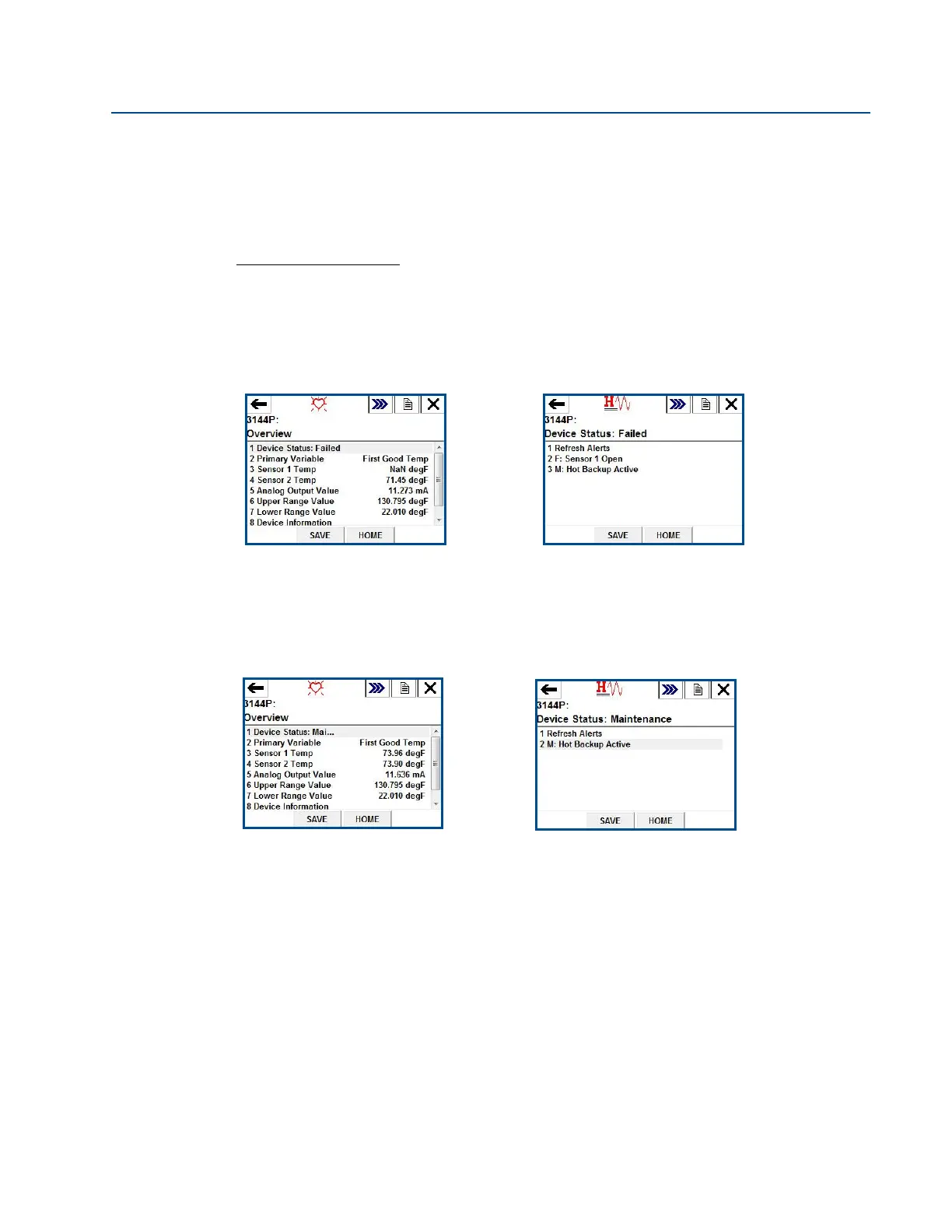
If your primary sensor fails, there will be a seamless transition where your second sensor
immediately takes over the process. The transmitter will report a Failed device status, indicating
Sensor 1 is open and Hot Backup is active. This is shown in the 475 Field Communicator in the
Overview section.
Choose 1 Device Status to view the active alerts.
After the sensor has been repaired or replaced, the 475 Field Communicator will display a
Maintenance Device Status, indicating Hot Backup is still active. This is shown in the 475 Field
Communicator in the Overview section.
Choose 1 Device Status to view the active alerts. Hot Backup is still active even though sensor 1
is repaired.
It is recommended Hot Backup be reset immediately after repairing or replacing the affected
sensor. See “Reset Hot Backup: Fast Keys 2-2-4-1-4” on page 78. After resetting Hot Backup, the
475 Field Communicator will display an Advisory Device Status, indicating that the configuration
has changed. This is shown in the Overview section. To clear this advisory, clear the configuration
changed flag, as shown below.















 To Next Page