78
Reference Manual
00809-0100-4021, Rev GC
Section 3: HART commissioning
April 2014
HART® commissioning
Reset Hot Backup: Fast Keys 2-2-4-1-4
When the Primary Variable is set to First Good Temperature, the secondary sensor will remain
on the 4-20 mA output until Hot Backup is reset, even after Sensor 1 has been replaced. Because
of this, it is recommended to reset Hot Backup immediately after Sensor 1 is replaced. If Hot
Backup is not reset and Sensor 2 fails, the transmitter will go into alarm. It will not transfer back
to Sensor 1 even if sensor one has been repaired.
When the Primary Variable is set to Average Temperature, it is also recommended to reset Hot
Backup immediately after Sensor 1 is replaced in order to clear the Hot Backup Active alarm.
However, with the PV set to Average Temperature, if Hot Backup is not reset and Sensor 2 fails,
the transmitter will simply switch to output the average of only Sensor 1.
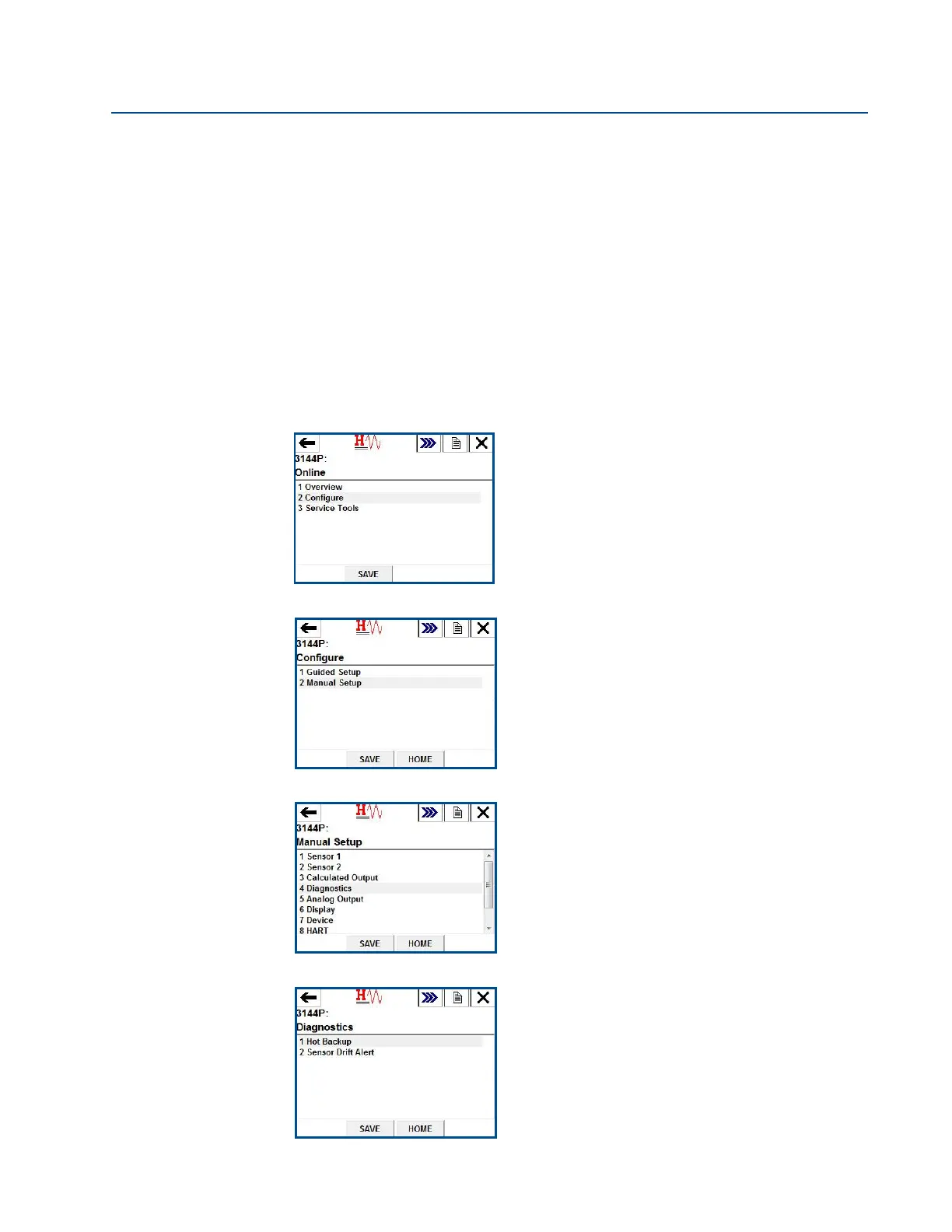
Steps to reset Hot Backup are shown below.
1. From the Home Screen, choose 2 Configure.
2. Choose 2 Manual Setup.
3. Choose 4 Diagnostics.
4. Choose 1 Hot Backup.















 To Next Page