72
Reference Manual
00809-0100-4021, Rev GC
Section 3: HART commissioning
April 2014
HART® commissioning
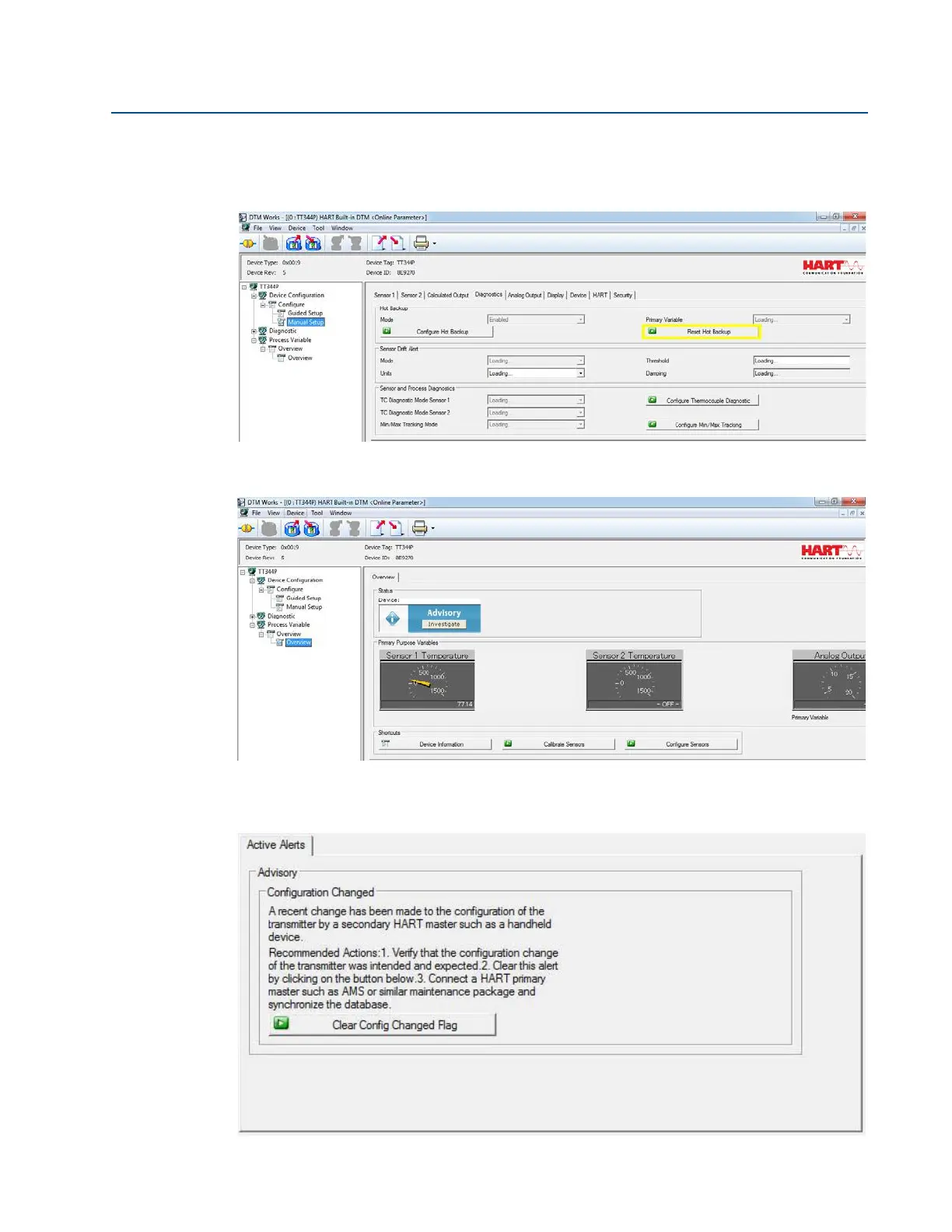
It is recommended that Hot Backup be reset immediately after repairing or replacing the
affected sensor. See “Reset Hot Backup: Fast Keys 2-2-4-1-4” on page 78 with a 475 handheld
communicator or reset it directly in the DTM by going to the Diagnostics tab of the Manual Setup
section and choosing Reset Hot Backup, as shown below.
After resetting Hot Backup, the device status in the Process Variable Overview section of the
DTM will change from Maintenance to Advisory, as shown below.
Investigate this advisory alert by choosing Investigate in the blue device status box. Another
screen will display the active alerts, indicating ADVISORY Configuration Changed, as shown below.
To clear this advisory, simply choose Clear Config Changed Flag and follow the steps.















 To Next Page