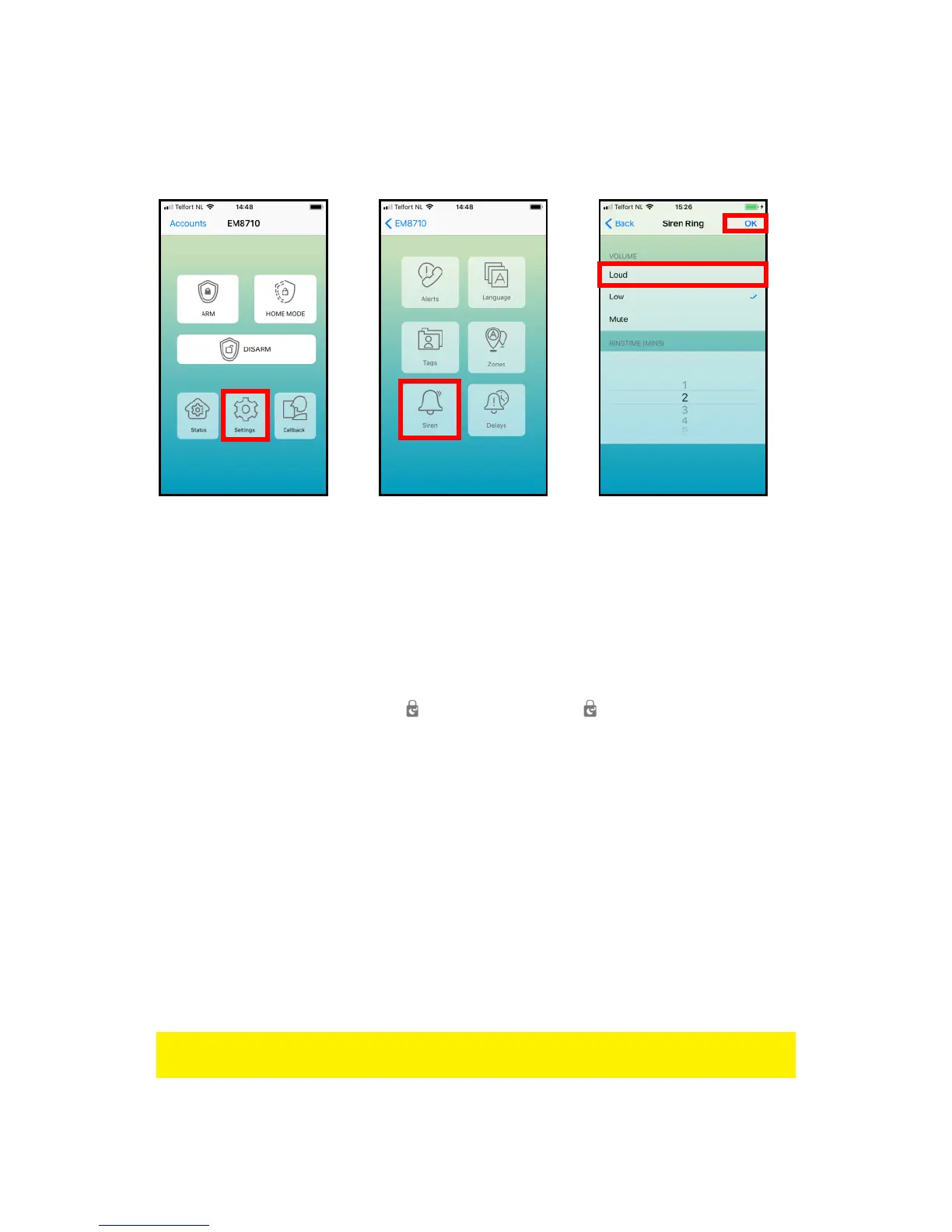
8.8 Adjust siren volume and time of alarm
Both settings can be adjusted by this menu.
With the EM8710 APP:
The text message to change the Siren volume is: “12” and the ringing time is: “13”.
Copy the received text into a new text message, modify the text and send the text
message to the GSM-number of the alarm system.
8.9 Change PIN
To change the PIN using the alarm panel:
Enter: current PIN code + 06 + “ ” + new PIN code + “ ”
8.10 Restore factory defaults.
The user may choose to perform a factory reset to return the device to factory default
settings. Please note that all configurations (including recorded alarm messages,
contact lists and linked sensors/devices) will be deleted. The PIN code will be reset
back to default PIN code “1234”.
1. Take the device off the wall. Note the alarm will sound because of its tamper
protection.
2. Remove all power sources including batteries and DC-jack.
3. Press and hold the reset button on the back (next to DC-jack) and insert the
batteries or DC-jack to power it on. Keep pressing the reset button until a beep
tone is heard. Release the button after beep tone.
4. The DISARM LED will turn on, followed by 5 short beeps indicating the reset to
factory default is complete.
Remark: After you restored the factory defaults you need to switch the alarm system
off and on again!



 To Next Page