Digital Servo Controllers
DSV 130 / DSV 132 / DSV 133
Operating Manual Rev. 1.8 www.engelantriebe.de Page 35
Notice:
Check the following points in case DSerV can not establish a connection:
Correct COM-port selected? (OPTIONS / COM-PORT )
Number of COM-port larger than 99 (USB to RS232 converter)?
In the extended connection options of the controller….
Serial cable connected to PC and servo-controller?
Servo-controller switched ON?
Does the *.dav file in your working directory match type and firmware of your
servo-controller?
Connect the RS232 after supplying the DSV.
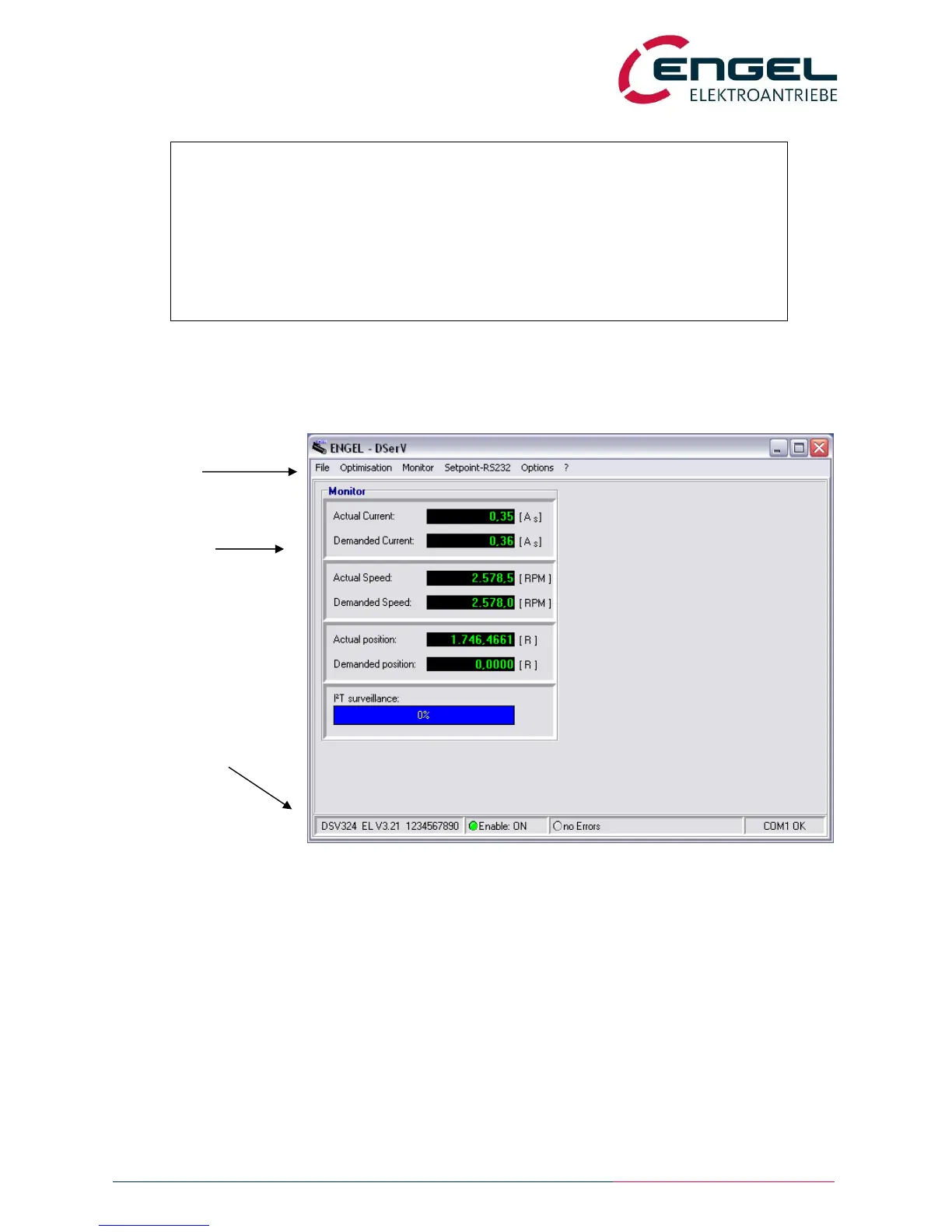
11.3 Using DSerV
Main Menu
Select functions here
Monitor Window
Display of …
actual and demanded values,
currents, speeds,
I²t integrator,
temperatures,
inputs/ outputs
Status Bar
Display of…
device type,
firmware version,
drive status,
errors in plain text,
communication status
fig: DSerV window
DSerV is an intuitive software with a graphical user interface typical for WINDOWS programs. The DSerV menus and
functions are explained below:


 To Next Page