9-4
Copying
R4C428_V2
long.bk Rev_C
A5 size COPY.FM
1/14/00 Pass 2
L
Proof Sign-off:
tantoname _______
leadername _______
editorname _______
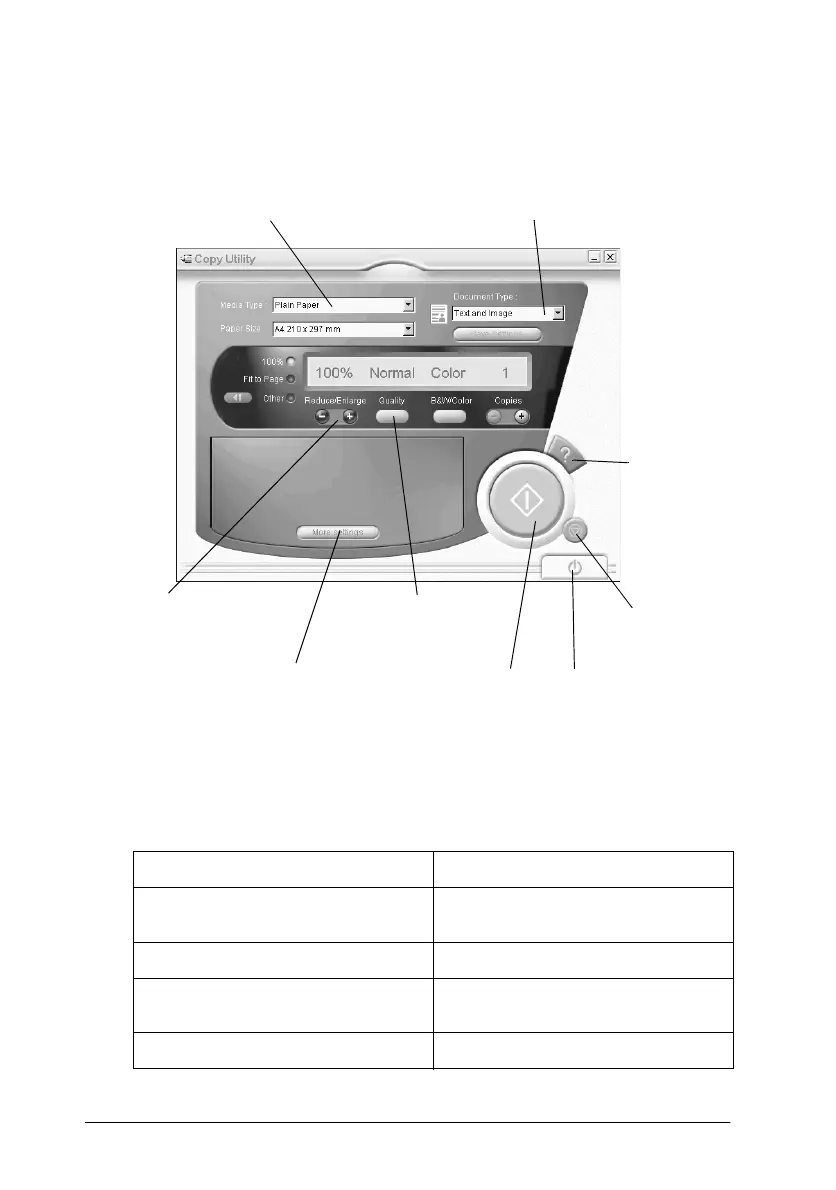
Making copy settings in the Copy utility
You can make copy settings in the Copy utility dialog box.
Refer to the table below for settings information. Click the
More
settings
button if you wish to make advanced and custom
settings. After you finish making settings, click the
x
copy button
to begin copying.
Help button Click for online help.
Stop/clear button Click to quit copying already in
progress.
Copy button Click to start copying.
Close button Click to close the utility, or the
menus for custom settings.
More settings button Click to make custom settings.
Media Type setting
Document Type setting
More settings button
Reduce/Enlarge
buttons
Quality button
stop/clear button
help button
close button
copy button



 To Next Page