REV.-A
c!
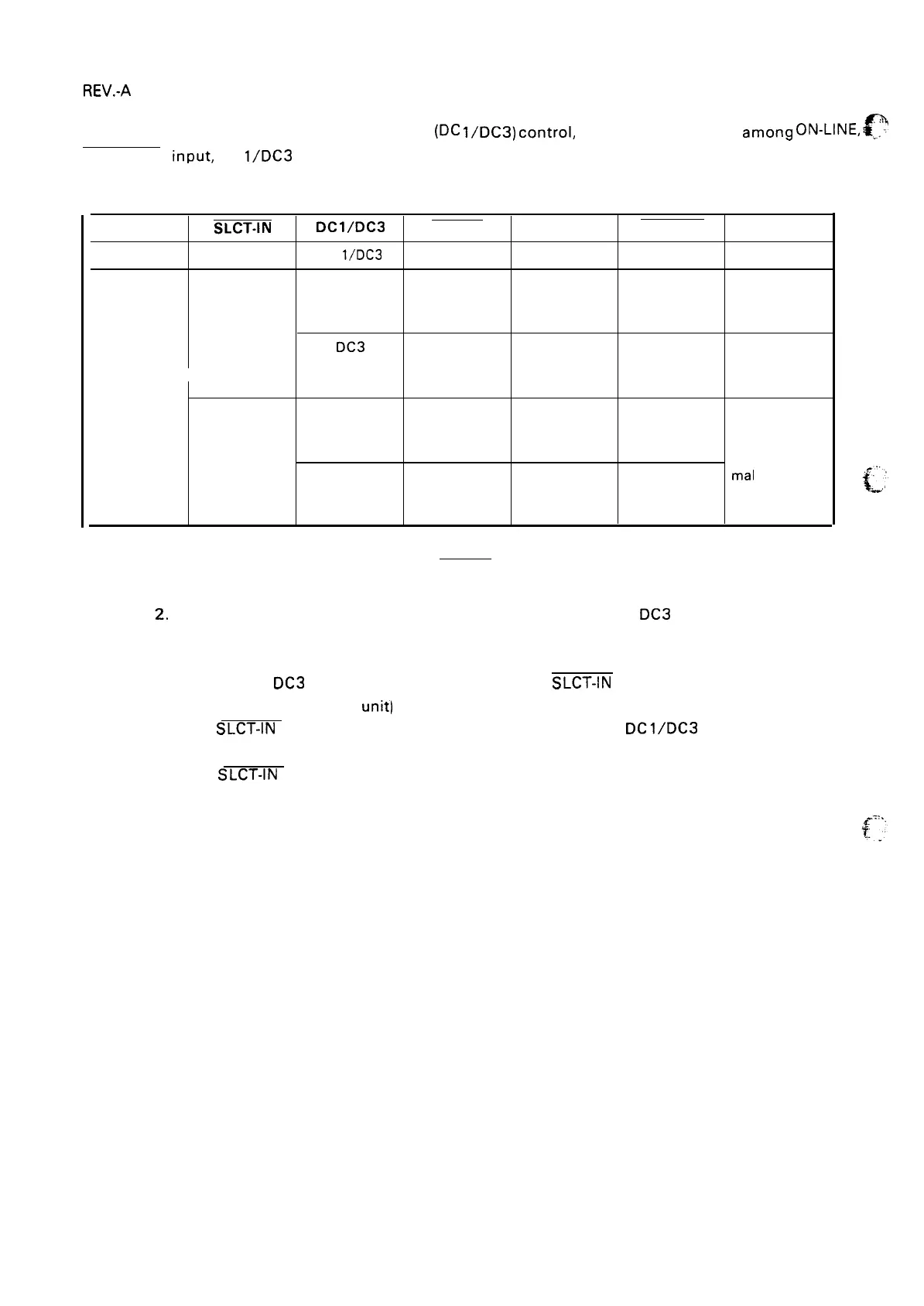
Table 1-12 shows Printer Select/Deselect (DC
l/DC3)
controL including relations amon9 ON-LINE, .
.
SELECT-IN input, DC
l/DC3
and interface signals.
Table 1-12. Printer Select/Deselect Control
ON-LINE SW
SLCT-IN
Dcl/Dc3
ERROR
BUSY
ACKNLG
DATA ENTRY
OFF-LINE
HIGH/LOW
DC
l/DC3
LOW
HIGH
No pulse
Disable
ON-LINE
HIGH
DC 1
HIGH
LOW/HIGH
Pulse output
Enable(Normal
(During data after entry
Process)
entry)
DC3
HIGH
LOW/HIGH
Pulse output Enable (Waits
(During data after entry
DC 1. See Note
entry)
2)
LOW
DC 1
HIGH
LOW/HIGH
Pulse output
(During data
after entry
entry)
Enable (Nor-
DC3 HIGH
LOW/HIGH
Pulse output
mal
process)
(During data
after entry
entry)
NOTES: 1. In Table 1-12, it is assumed that no ERROR status exists other than that attributable to the
OFF-LINE mode.
2, Once the printer has been put in the deselected state by the DC3 code, the printer will
not revert to the selected state unless the DC 1 code is input again. (In the deselected state,
the printer ignores input data until the DC 1 code is received.)
3. The DC 1 and
DC3 codes are enabled only when the SLCT-IN signal (Input Connector No.36
for the parallel interface
unit) is HIGH and printer power is initialized.
4. if the
SLCT-IN signal is LOW when the printer is initialized,
DC1/DC3
printer select/de-
select control is invalidated, and these control codes are ignored.
5. If the
SLCT-IN signal is HIGH and is not set to LOW by jumper 1 when the printer is
initialized, the printer starts from the selected (DC 1 ) state.
1-14



 To Next Page
 Loading...













