EasyManua.ls Logo

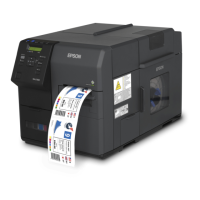
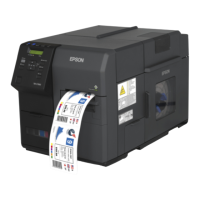
Epson TM-C7500 Series - User Manual

Epson TM-C7500 Series
224 pages
Print Icon
To Next Page IconTo Next Page
Loading...
Describes how to handle the product.
Describes setup and installation of the product and peripherals.
Describes how to control the printer and necessary information
when you develop applications.
Describes general specifications and character code tables.
Describes features for the product.
Technical Reference Guide
SeriesSeries
/
M00079105
Rev. F
Product Overview
Setup
Handling
Application Development Information
Appendix

Table of Contents

Questions and Answers

  • A
    Anthony MitchellJul 26, 2025
    What to do if my Epson TM-C7500 says 'MEDIA DETECTION ERROR'?
    • W
      Wendy FuentesJul 26, 2025
      This error can occur for a few reasons related to paper type settings. First, ensure the paper type loaded matches the 'Media position detection settings'. If not, either change the paper to match the settings, or adjust the settings to suit the paper. Second, verify that the paper type specified in your label printing application or printer driver matches the loaded paper. Change the application or driver settings to align with the paper. Finally, if using the 'Favorite setting' on the operation panel, make sure the selected media is compatible with the media type configured in that setting. Choose a compatible media or adjust the 'Favorite setting' to match your media.
  • J
    Jacqueline MooreAug 10, 2025
    How to fix 'PAPER OUT' error on Epson Label Maker?
    • A
      Amy LevyAug 10, 2025
      When using roll paper: Open the paper set cover and the roll paper cover. Remove any existing paper or paper roll. Set a new roll paper and run auto loading. Close both covers. When using fanfold paper: Open the paper set cover, remove any remaining paper, set the new paper in place, run auto loading, and close the cover.

Summary

Product Overview

Operation Panel

Describes the function of each button and indicator on the operation panel.

Status;Error Indications

Details how LEDs and the LCD indicate printer status and errors.

Setup

Install Navi

Step-by-step guide for setting up the printer using the installation software.

Installing the Printer

Instructions for physically installing the printer unit.

Location Appropriate for Installation

Guidelines for selecting a suitable environment for printer placement.

Connecting the Power Cable

Procedure for connecting the printer to a power source.

Connecting the Interface Cable

Instructions for connecting the printer to a computer or network.

Installing the Ink Cartridge

Guide for inserting and replacing ink cartridges.

Installing the Maintenance box

Instructions for installing and replacing the maintenance waste ink box.

Setting the Roll Paper

Detailed steps for setting roll paper into the printer.

Handling

Cleaning the autocutter

Steps to clean the autocutter blade assembly.

Troubleshooting

Guidance for diagnosing and resolving printer issues.

Error Processing

Specific steps to resolve printer error conditions.

Poor print quality

Solutions for common issues related to print quality.

Paper is jammed

Instructions for safely removing jammed paper.

Application Development Information

Using the Epson Inkjet Label Printer SDK

Information on using the SDK for application development.

Epson TM-C7500 Series Specifications

General IconGeneral
Resolution600 x 1200 dpi
ColoursCyan, Magenta, Yellow, Black
Power SupplyInternal
Print SpeedUp to 300 mm/sec
Media Width2" (50 mm) - 4.25" (108 mm)
InterfaceUSB, Ethernet
WeightApproximately 37 kg
Print Width4.09" (104 mm)
Media TypesRoll
Supply VoltageAC 100-240V, 50/60 Hz
Media Thickness0.08 to 0.2 mm

Related product manuals