Equil
TM
Insulin Patch Pump System
97
13.6 User Settings
Press User Settings to enter the User
Settings.
Username:
Password: For security, choose
"password" to force the user to enter a
password during power-on and wake up.
The password must be 6 characters, which
can be any combination from the letter "A-
F" and the number "0-9". If you forget your
password, you can use the Pump Serial
number to unlock.
Change Password: Use to reset the
password.
Restore Factory Settings: All settings
reset to the factory defaults.
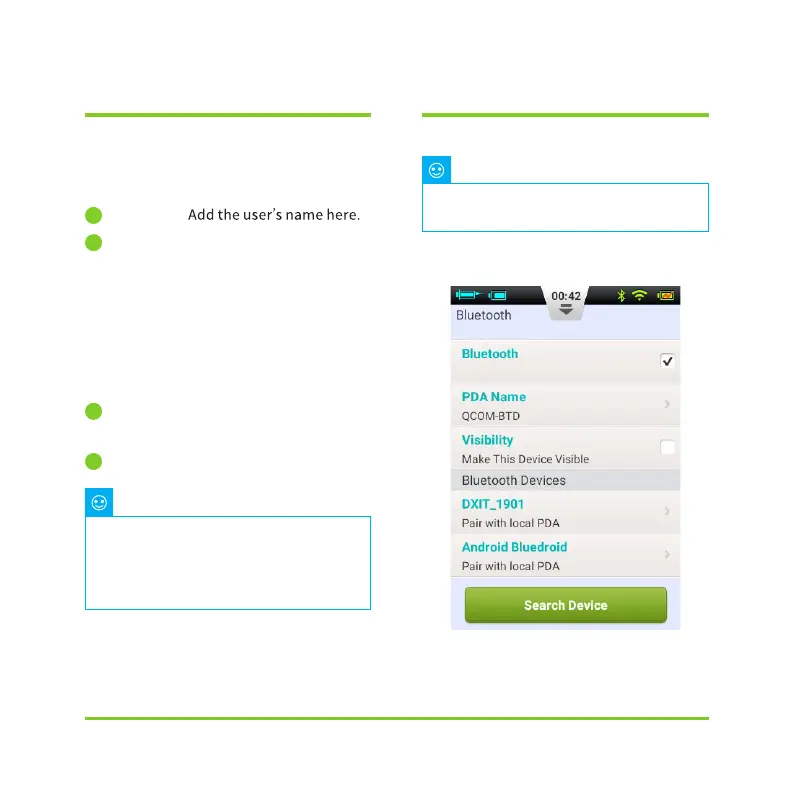
13.7 Bluetooth
From the General Settings screen,
choose Bluetooth (Figure 113).
Figure 113
1
2
3
4
The Bluetooth function requires a
microSD card to be installed.
Note
Once the factory settings have been
restored, all saved settings will be lost
(except for time). Please make a note of
all important settings before restoring
factory settings.
Note


 To Next Page