Equil
TM
Insulin Patch Pump System
27
basal rate.
3
Actions: Pressing this button takes
you to the Actions Screen where you can
start a new reservoir, initiate a new pump,
manually enter your blood glucose level,
access the food library, or access the music
player.
4
History:Takes you to therapy history
and historical averages.
5
Settings:Press this to go to the Settings
Menu.
6
Suspend/Resume: Pressing this button
allows you to quickly suspend or resume
insulin delivery.
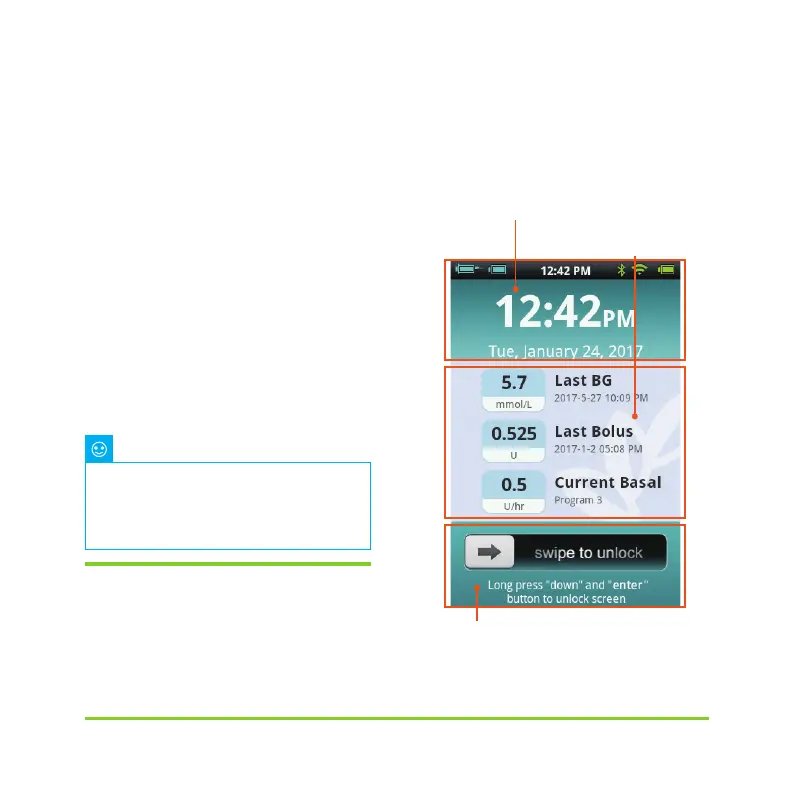
4.5 Lock Screen
If you press the power button to switch
the di
splay off, or the display switches off
automatically after a period of non-use,
the display can be switched on again by
pressing the power button. The PDA will
enter the lock screen as shown in Figure 29.
Figure 29
For more detailed information,
please refer to subsequent sections of
this user guide explaining the functions
in greater detail.
Note
Time and Date
Information Display Area
Unlock Area


 To Next Page