Equil
TM
Insulin Patch Pump System
11
4 Getting Started
4.1 PDA Setup
1
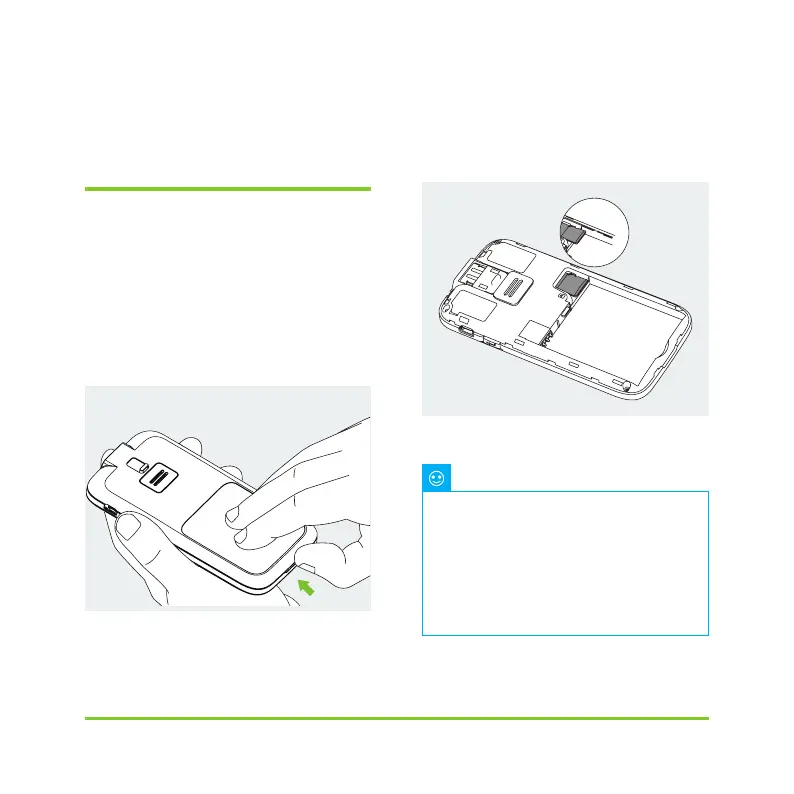
Remove the battery cover: Holding
the PDA firmly with one hand, lift up
the battery cover by inserting your
fingernail into the slot shown in
Figure 4.
Figure 4
2
Insert a microSD memory card:
Insert memory card into the slot as
shown in Figure 5.
Figure 5
Finger Hold
The microSD memory card must be
inserted with the battery removed. A microSD
card is not provided with your pump package,
but you may provide your own. The microSD
card is not needed for the primary functions
of the pump system. However, secondary
functions such as data transfer capability and
MP3 player functions will not work correctly
without a memory card inserted.
Note


 To Next Page