Equil
TM
Insulin Patch Pump System
77
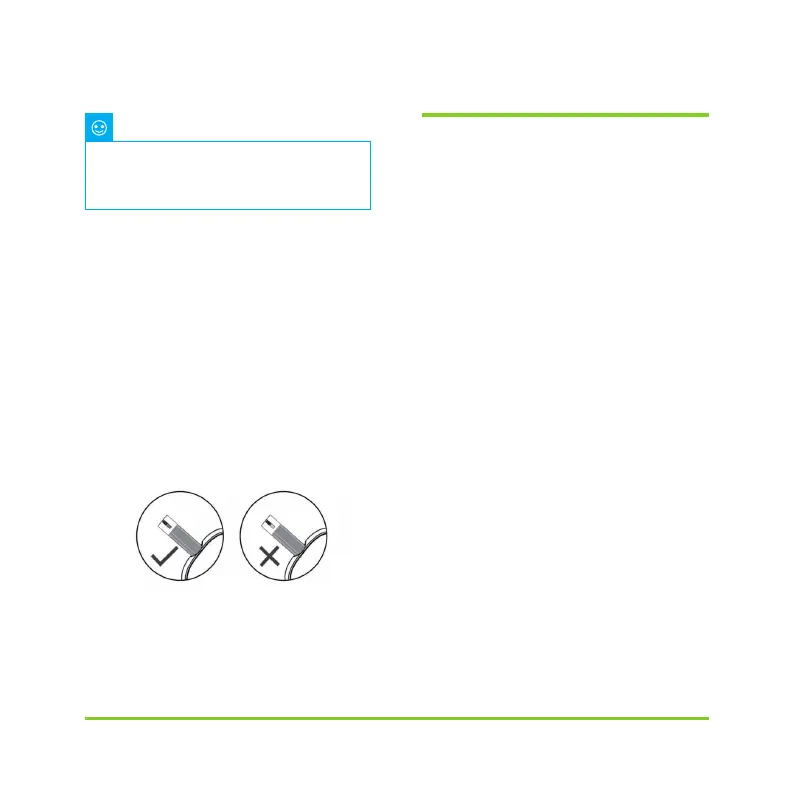
Figure 98
10.7 Comparing Meter and Lab
Results
Your PDA's blood glucose meter and
laboratory equipment both report glucose
concentrations in the serum or plasma
component of your blood. However
variations between the two are normal,
and your meter results and laboratory
results may be slightly different.
To ensure a reasonable comparison
between your meter and laboratory
results, please follow these guidelines:
1
Make sure the PDA's meter is working
properly.
2
Comparisons will be more accurate
if you d
o not eat for at least four hours
(preferably eight hours) before testing.
3
Bring your PDA, test strips, and control
solution to the lab.
4
Ensure that the time between tests with
your PDA and the laboratory is within 15
minutes.
Your blood glucose level is
automatically saved to history upon
leaving the BG meter function.
Note
As shown in Figure 98, apply the blood
sample to the edge of the strip until the
test window is full.
The PDA screen will begin to count down
when there is adequate blood. If the test
window is not full, you may add additional
blood within three seconds. If not enough
blood has been applied, an error will be
displayed. Please discard and use a new
test strip. If you see that the test window is
not full, but the countdown begins anyway,
please discard and use a new test strip.


 To Next Page