Equil
TM
Insulin Patch Pump System
39
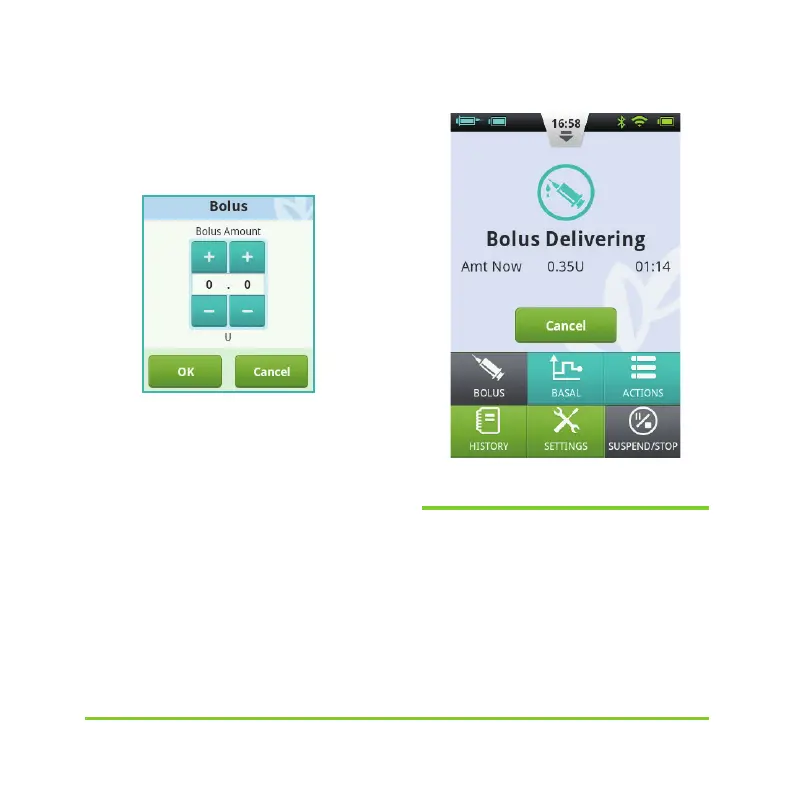
Choose the Bolus button in the upper
left corner to open the dialog box (Figure
43). Choose your bolus amount and press OK.
Figure 43
If the Bolus amount is not 0, the Start
button will be green, and you can choose
the Start button to begin to administer
the bolus. A window will open for you to
confirm that you want to send the bolus.
(Your last bolus amount and time will be
shown as a reminder).
While the pump is delivering, the PDA
will revert to the Home Screen and display
the bolus status (Figure 44).
Figure 44
6.3 Bolus Presets
The Bolus Screen contains three
programmable preset boluses (Figure 45).


 To Next Page