Equil
TM
Insulin Patch Pump System
47
6.7 Settings
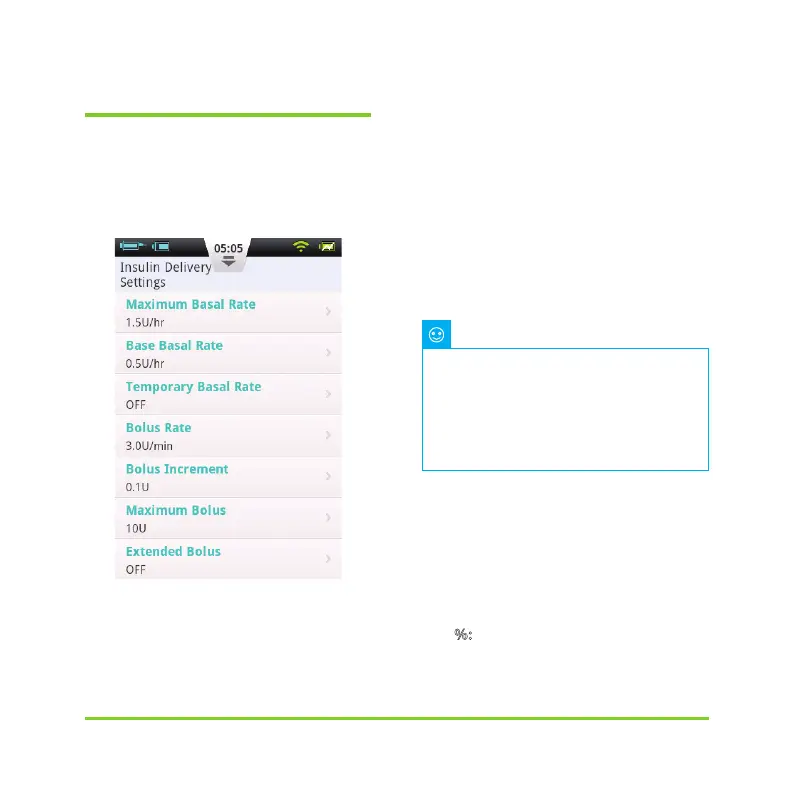
From the Home Screen, the Bolus
settings can be found at "Settings - Bolus
Settings" as shown in Figure 52.
Figure 52
1
Bolus Rate: The normal bolus delivery
rate is 3.0U/min. Use this menu to
decrease the bolus rate to 1.5U/min.
2
Bolus Increment Setting: This is the
amount that the requested bolus changes
when pressing the "+" or "-" button.
3
Maximum Bolus Setting: This is the
maximum bolus that the user can choose
in the bolus menu.
4
Extended Bolus Settings:
a) OFF: Extended bolus fu
nction is off,
and corresponding button will be greyed
out (default)
b) U: The Amount Now will be displayed
in Units of insulin (U).
c) %
: The Amount Now will be displayed
This feature is used to reduce the
Note
possibility of overdosage due to error.
Try to set this value as the maximum
bolus that you would normally give.
Setting this value too high increases
the risk of overdosage by maloperation.


 To Next Page