Equil
TM
Insulin Patch Pump System
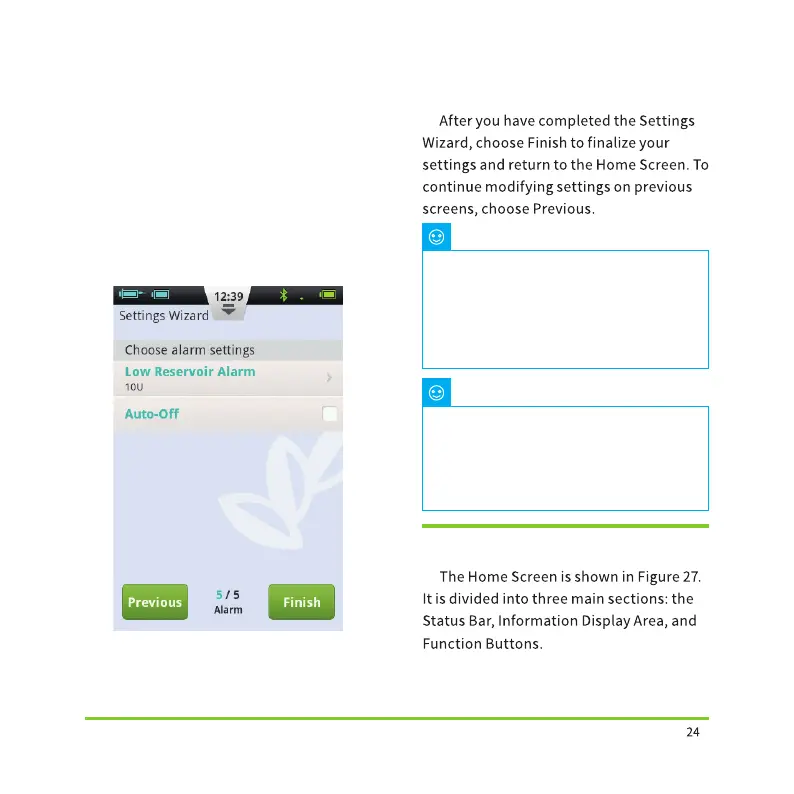
Figure 26
4.4 Home Screen
Note
Note
choose the Low Reservoir Alarm Threshold
setting, a dialog box will open that allows
you to choose when the device will give
you an alert warning when the amount of
insulin remaining in the reservoir is low
and that youshould consider filling a new
reservoir. Use the “+” and “-” buttons
to select the appropriate value.
After you have completed the
Settings Wizard, you can use all of the
basic functions of the pump system.
However, please read the additional
sections of this user guide as they
describe the features in greater detail.
After you have completed the
Settings Wizard for the first time, you
may return to the Wizard by going to
the Home Screen and choosing Settings
and then Settings Wizard.


 To Next Page