Equil
TM
Insulin Patch Pump System
23
After you have finished choosing the
Basic Bolus settings, choose Next to enter
the fourth Settings Wizard screen, or Back
to enter the previous setting screen.
Advanced Bolus Settings
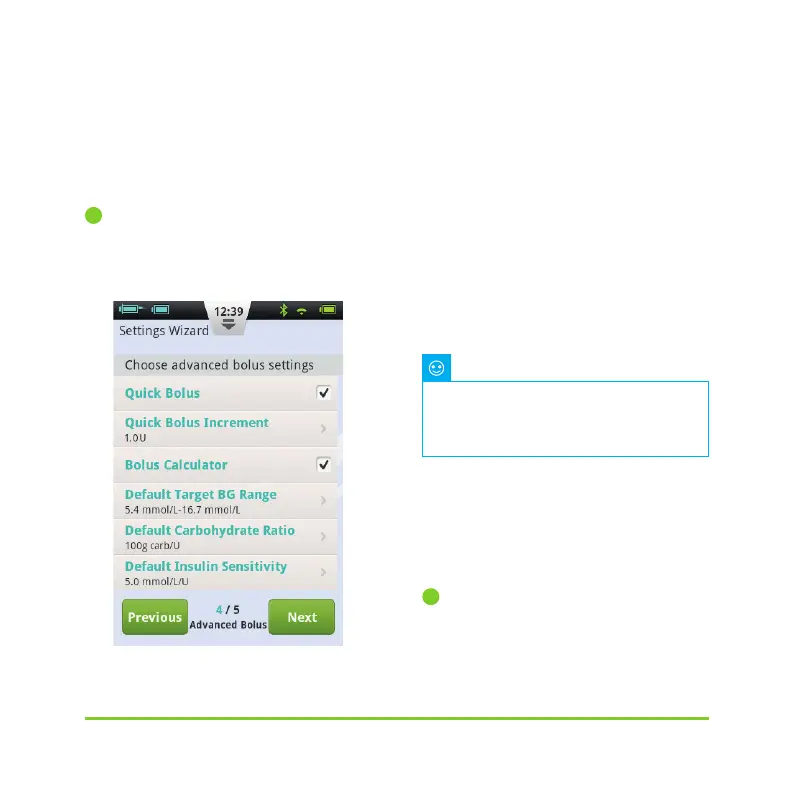
The fourth screen in the Settings Wizard
shows the Advanced Bolus Settings (Figure
25).
Figure 25
a) The Quick Bolus function allows the
user to administer a bolus using only
one button. This feature is switched off by
default. For more detailed information
about this feature, see Section 6.7
b) The Bolus Calculator can help the user
decide on the size of a bolus by taking into
account blood glucose levels and other
parameters. This feature is switched off by
default. For more detailed information
about this feature, see Section 11.3
After you have finished choosing the
Advanced Bolus settings, choos
e Next
to enter the fifth Settings Wizard screen,
or Previous to enter the previous setting
screen.
Alert Options
The fifth screen in the Settings Wizard
shows the Alert Options (Figure 26). If you
These two features are relatively
advanced and MicroTech recommends
proper training and practice before
using these features.
Note
4
5


 To Next Page