Equil
TM
Insulin Patch Pump System
91
12 History
12.1 Viewing Your History
From the Home Screen, press the
History button to view your records.
12.1.1 Daily Log
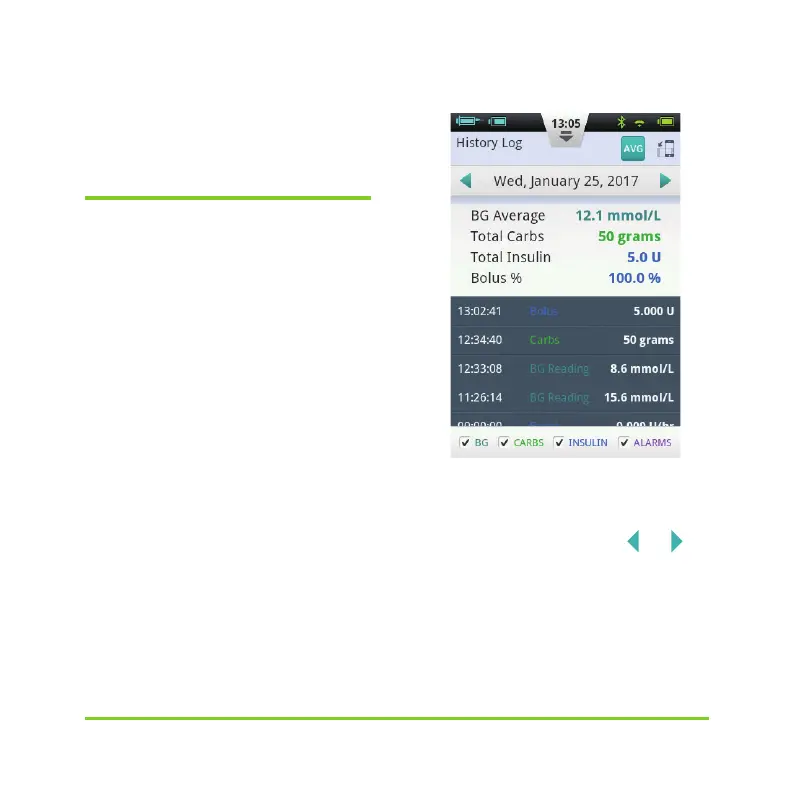
After you press the History button, the
PDA will display the Daily Log if the PDA is
held in portrait orientation (Figure 108). In
this screen, you can browse your historical
records and view daily totals and other
statistics.
Figure 108
Press the date near the top of the screen
to open a window in which you can choose
any calendar day, or press the
or
button to scroll to the previous or next day.
Below the date, you can see the BG
average, Total Carbs, Total Insulin and
bolus % of total insulin for the day.


 To Next Page