Equil
TM
Insulin Patch Pump System
25
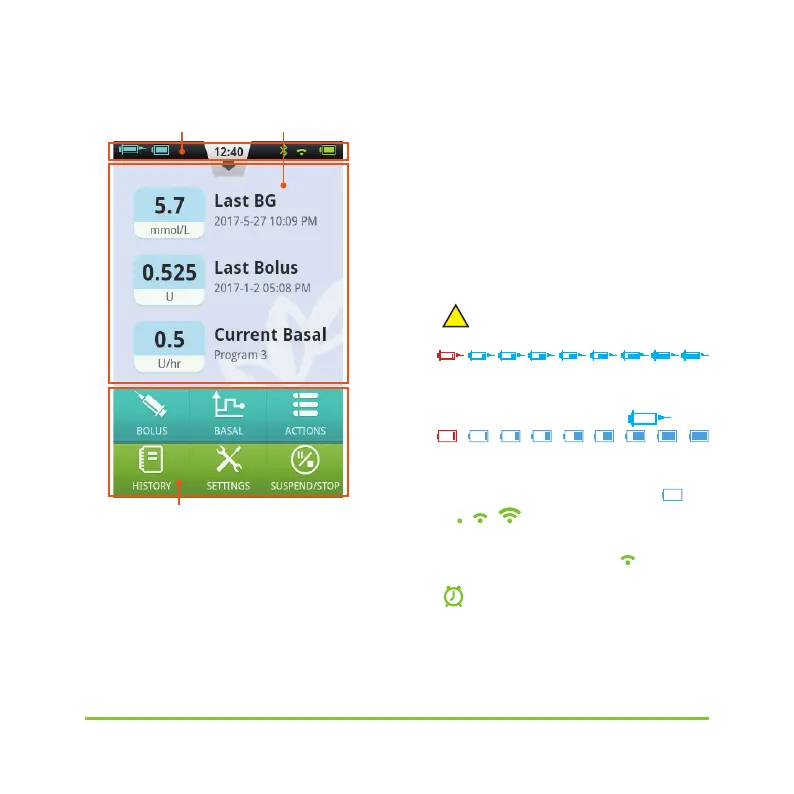
Figure 27
Status Bar:
The Status Bar contains icons that
describe the status of the pump and PDA.
The icons shown on the left are generally
related to the pump (blue), and the icons
on the right are generally related to the
PDA (green). Each Icon in the Status Bar is
described below:
•
Username:Displays the name of the
user.
•
Insulin Pump Serial Number: Displays
the serial number of the pump that is
currently connected
•
!
Alert icon: If an alert appears, this
icon will appear on the status bar.
•
Insulin Remaining:Shows how much
insulin remains by varying degree;if PDA
wireless link is poor it displays
?
。
•
Pump Battery Level:Shows the pump's
battery level status in varying degrees; if
PDA wireless link is poor, it displays
?
。
•
Wireless Link Status:
Shows the wireless link strength between
pump and PDA. It dispalys
!
when the
connection is totally lost.
•
Blood Glucose Test Reminder
(BG Reminder):This icon will appear on
the status bar if a Test Reminder has been
programmed.
Status Bar Information Display Area
Function Buttons


 To Next Page