Equil
TM
Insulin Patch Pump System
13
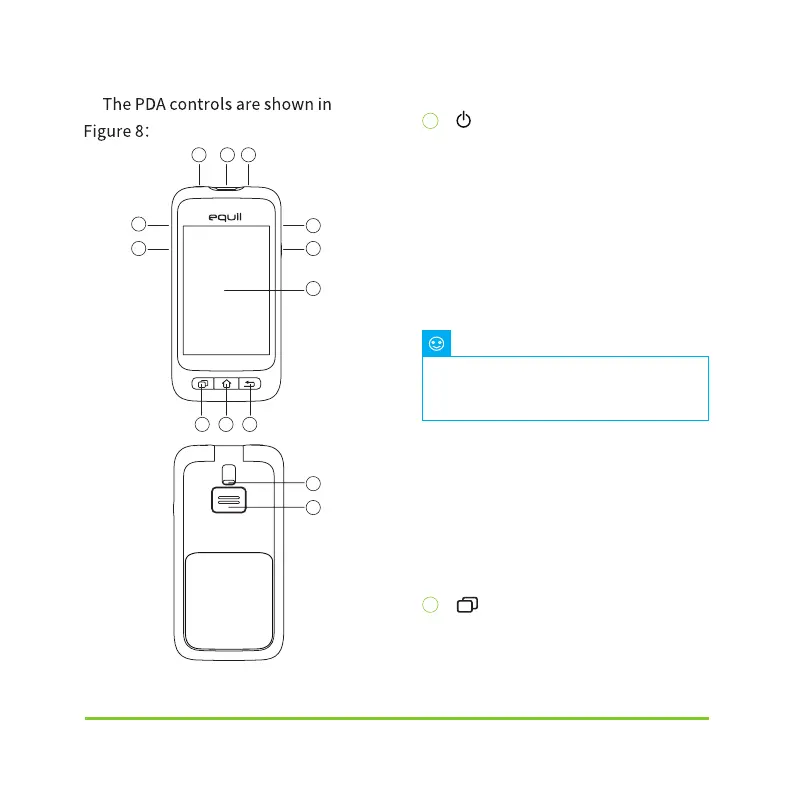
(Power Button)
Power On:Press and hold this key and the
PDA will vibrate, begin the startup process,
and enter the home screen after about 30
seconds.
Screen Off: If the PDA display is on,
pressing the Power Button will switch the
LCD display off and the PDA will enter
standby mode .
Screen On: When in standby, pressing the
power button will switch the display on and
present the lock screen.
Power Off: If the display is on, press and
hold the power button to open a dialog
box to confirm that you would like to switch
the device off.
(Help Button)
If you need help with commands or
funct
ions of the PDA, you can press the
The PDA display will also switch off
andenter standby mode after a preset
time. See Section 13.6 for more information.
Note
1
1 10 11
12
13
2
5
9
7
8
6
2 3 4
Figure 8
5


 To Next Page