1 INTRODUCTION
0460 949 474
- 9 -
© ESAB AB 2021
GENERAL CONFIGURATION
FAST MODE SOFT BUTTONS
QUALITY DATA LOG TO FILE
SOFT KEYS SETUP►
AUTO SAVE MODE
UNIT OF LENGTH
1
ON
OFF
METRIC
QUIT
Position the cursor on the row for correct measurement and press ENTER.
METRIC
INCH.
1.3 Display
SAW
PROCESS
METHOD
REGULATION TYPE
WIRE TYPE
WIRE DIMENSION
CONFIGURATION►
TOOLS►
SAW
DC
CA
Fe SOLID
3.0 mm
SET MEASURE MEMORY FAST MODE
Cursor
The control panel's cursor is presented as a black field around the text, with the selected text
turning white. The cursor is displayed in the instruction manual with bold text
Text boxes
At the bottom of the display are five boxes containing text that describes the current function
of the five soft keys below the display.
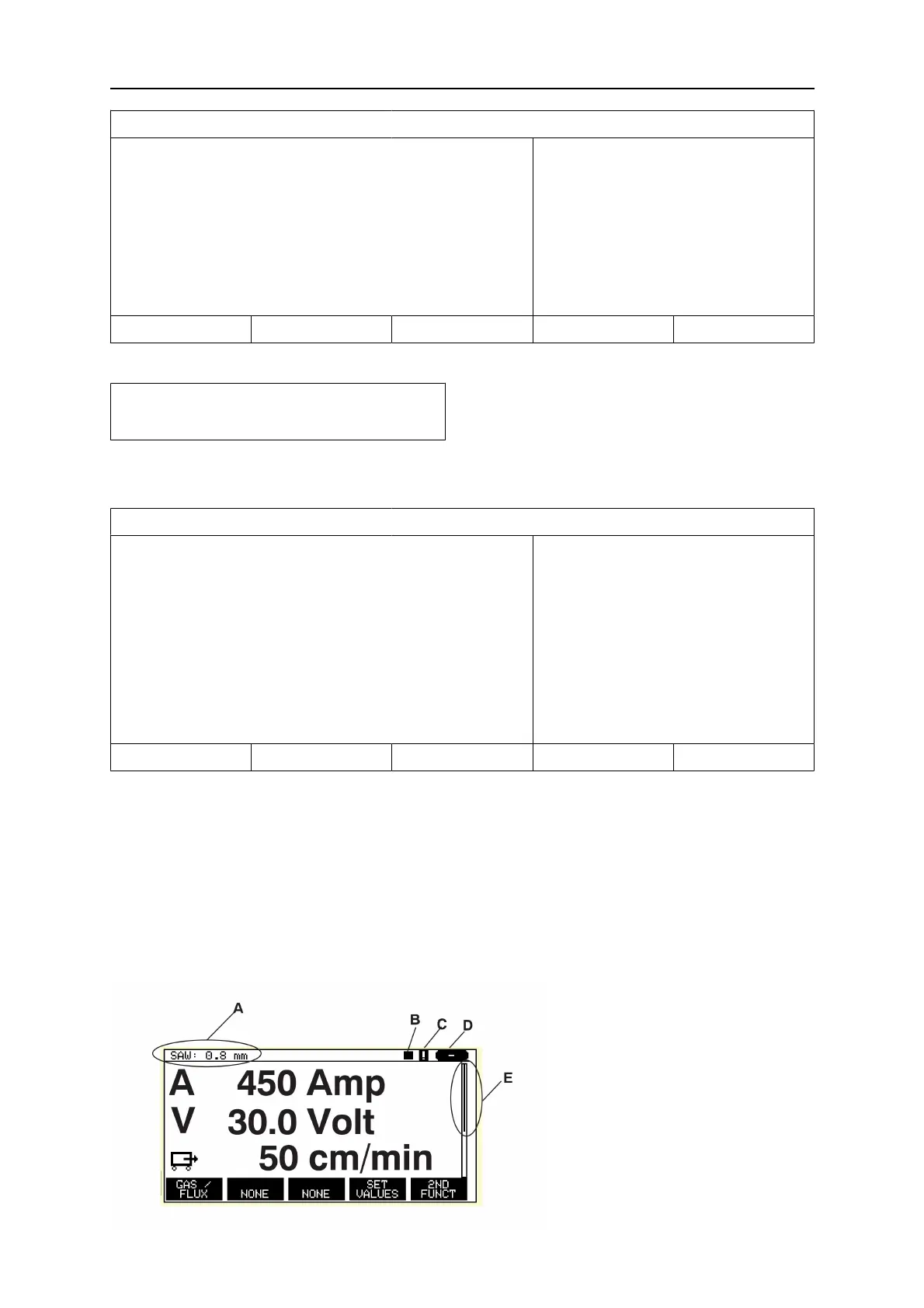
1.3.1 Symbols in the display
A The selected weld data set
B Welding direction
C A fault has occurred, see
section "Event handling".
D Recalled memory position
number
E Scroll bar. Further information
can be found in this menu



 To Next Page