Manual 0463 413 001 OPERATION 3-11
3.11 Control Panel
After power on has completed the main menu appears on the control panel.
NOTE!
System output status will be indicated by the screen background color. Red/Or-
ange means the torch is live/hot. No trigger needed. Blue means a trigger has to
be used and Green means system is in Set Up mode and not able to be activated.
Process selection colors are similar. If a welding process has a blue indication
then a remote trigger devise needs to be used when that process is selected. If
the process has Red/Orange color, then it will be live/hot as soon as it is selected.
Green means system is in Set Up mode and the torch cannot be activated..
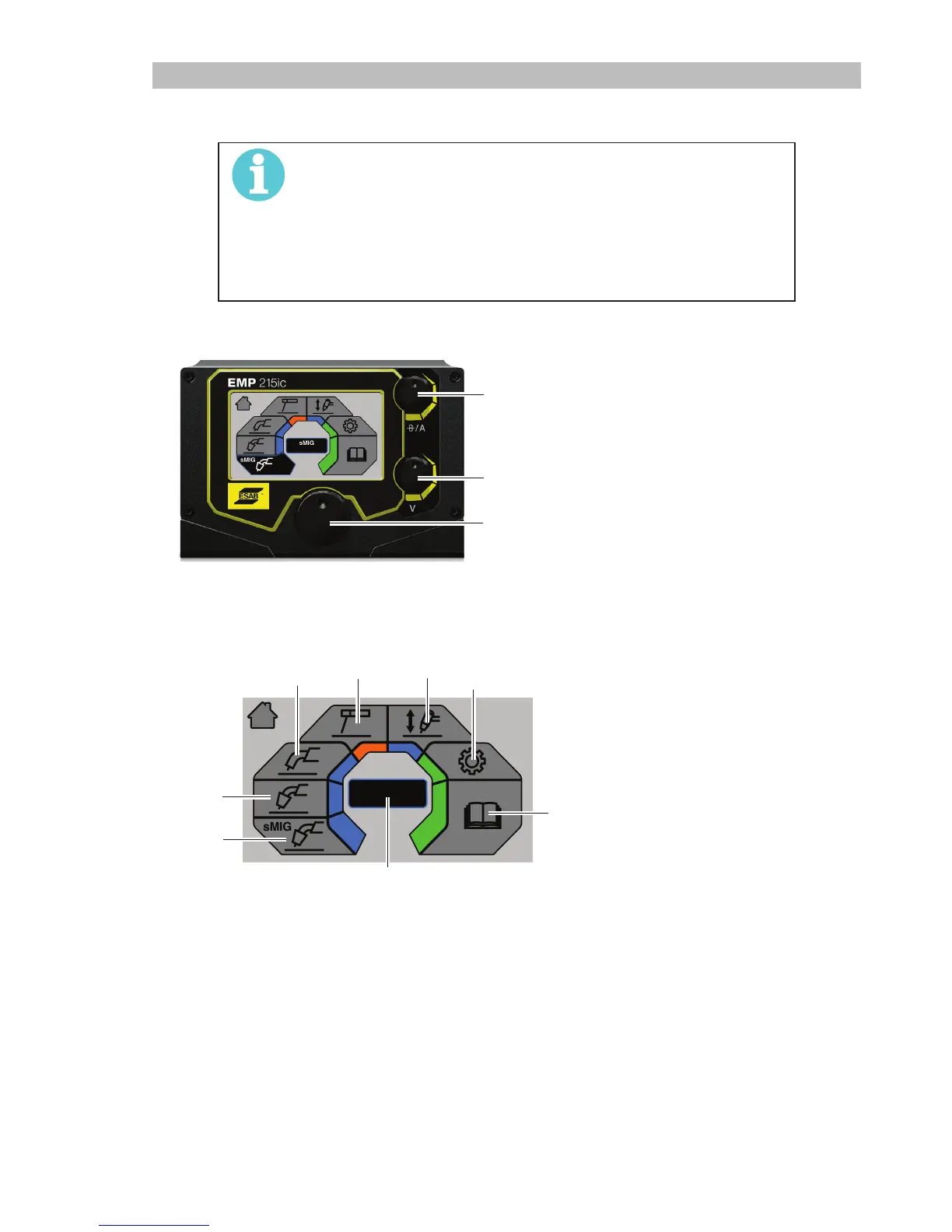
3.11.1 How to Navigate
1.
Current / Wire feed speed selection
2.
Volt age selection
3.
Menu navigation. Rotate and push to
select menu option.
1
2
3
3.11.2 Main Menu
EMP215ic
1.
sMIG mode
2.
Manual MIG mode
3.
Flux cored wire mode
4.
Stick/MMA mode
5.
Lift-TIG mode
6.
Settings
7.
User manual information
8.
Dialogue box
8
1
2
3
4
5
6
7



 To Next Page