17
To connect the device to the Internet via an optionally connected 4G/LTE dongle, please proceed as
follows:
> Turn off the device and have your PIN code ready to unlock your SIM card
> Then connect the 4G/LTE dongle with antennas to the device
> Put your SIM card in the SIM card slot of the dongle (Refer to the Installation Guide of the ESX device)
> Turn the device on again
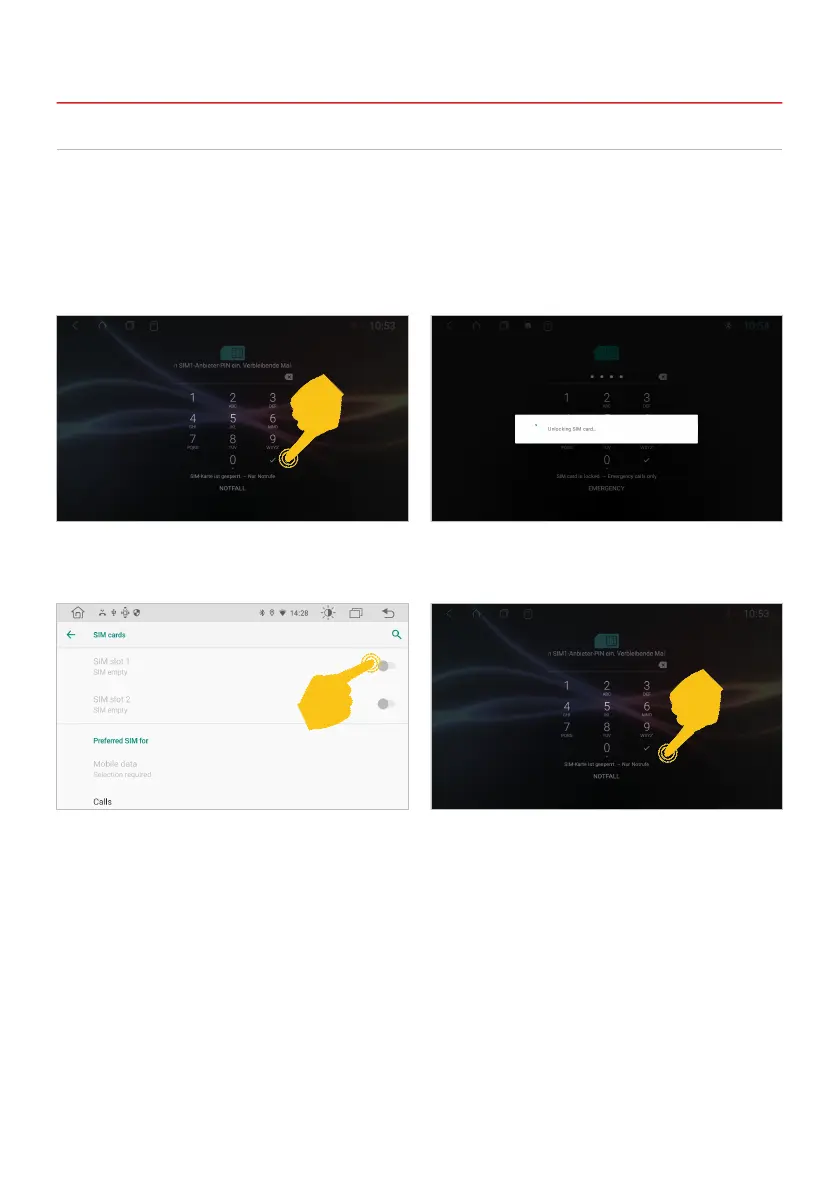
After the device has started, enter your 4-digit PIN
code of the SIM card here. Conrm the entry with
the tick.
If the device is successfully connected to the
mobile Internet, the “4G” symbol appears in the
status bar at the top right.
After successful entry, the SIM card is unlocked.
If the device is switched off, you have to enter the
PIN code of the SIM card again after each restart,
just like with a smartphone.
2.6 INTERNET CONNECTION VIA 4G/LTE
Note: You can also deactivate the request for the PIN code of your SIM card so that you do not
have to enter it again after each device start. To do this, insert the SIM card into a smartphone
and deactivate the request for the PIN code in accordance with the instructions of the mobile
network operator or the smartphone manufacturer.
2. BASIC SETTINGS



 To Next Page