26
To enable wireless phone calls, audio streaming or data exchange, you must connect the device to
another Bluetooth
®
mobile device. First you have to activate the Bluetooth function on your mobile
phone.
Important instructions:
1. Legal restrictions may apply to the operation of Bluetooth® devices exist.
Please observe the local laws.
2. To keep the Bluetooth® connection secure, you should use a secure one and
a non-public place while you connect a Bluetooth® device.
3. Do not start the initial connection while driving.
3.3 BLUETOOTH
®
/ BT MUSIC
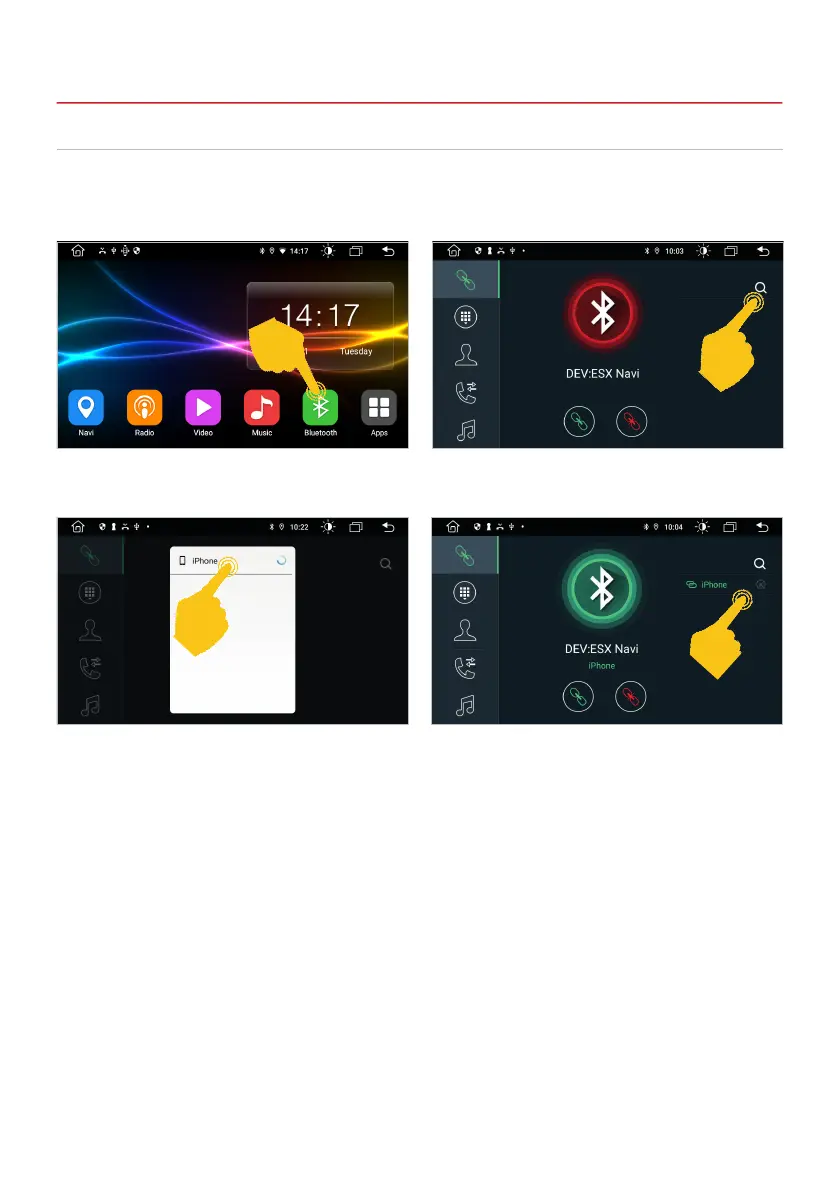
At the top right, tap the magnifying glass to select
your smartphone.
Tap Bluetooth in the main menu of the ESX device.
Your smartphone is now connected to the ESX
device via Bluetooth and connects again each
time it is started. If you want to disconnect, tap the
X in the top right corner.
Tap on the name of your smartphone. You will
then receive a message on your smartphone that
ESX Navi wants to connect. Conrm the pairing
process.
3. INFOTAINMENT



 To Next Page