30
If you have an iOS smartphone, you can connect it to the ESX device using its charging cable via one
of the USB ports. In the settings of the iOS smartphone, you must grant the required approvals under
the Car Play section.
If you have an Android smartphone, you can connect it to the ESX device using its charging cable via
one of the USB ports. In the settings of the Android smartphone, you must grant the required approvals
under the Android Auto section.
3.6 MEDIA CONNECT / PHONELINK (DEPENDING ON EQUIPMENT)
3.7 EASY CONNECTION
3. INFOTAINMENT
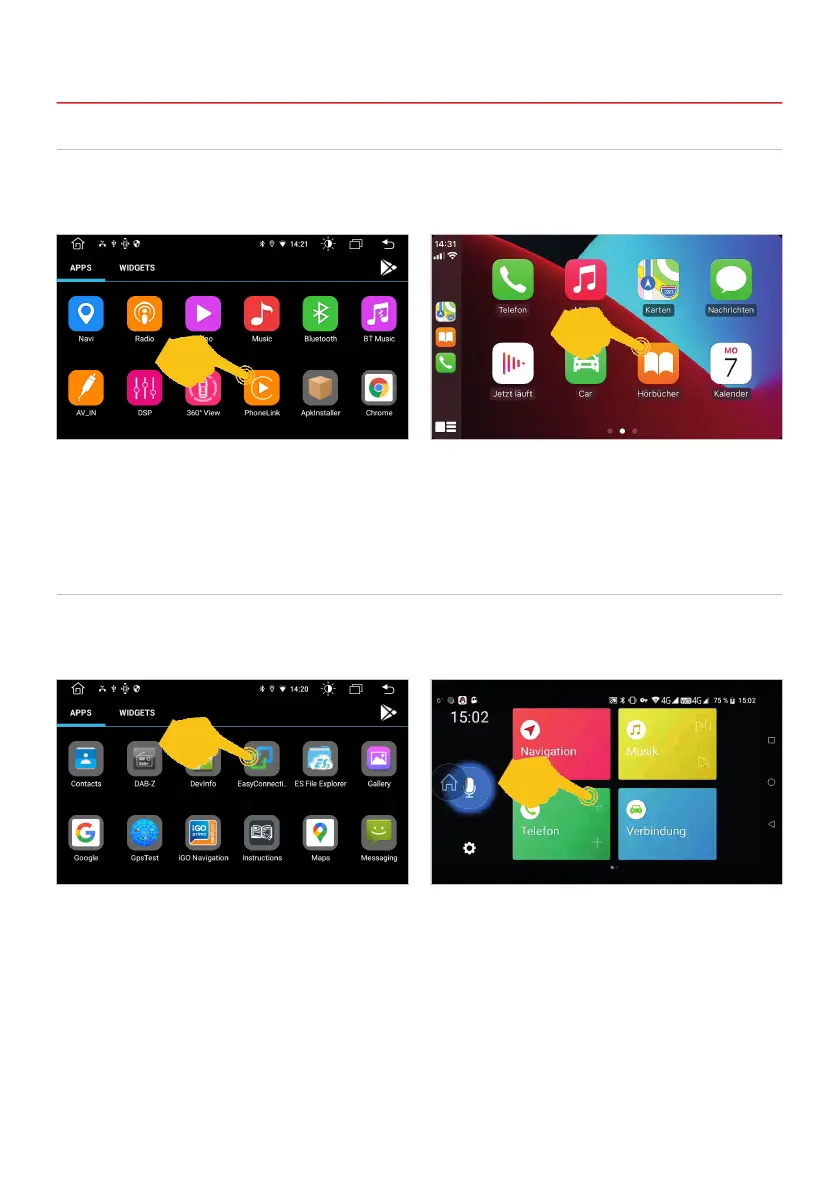
Tap on PhoneLink in the app menu and the iOS
smartphone connects to the ESX device. The
Bluetooth connection is deactivated and the
smartphone is charged.
Tap on EasyConnection in the app menu and the
Android smartphone connects to the ESX device.
In the PhoneLink menu you can now access your
iOS smartphone via the touchscreen of the ESX
device. As long as the smartphone is connected,
the Bluetooth connection remains deactivated.
In the EasyConnection menu you can now access
your Android smartphone via the touchscreen of
the ESX device.



 To Next Page