21
2. BASIC SETTINGS
2.10 ADDITIONAL CAMERA
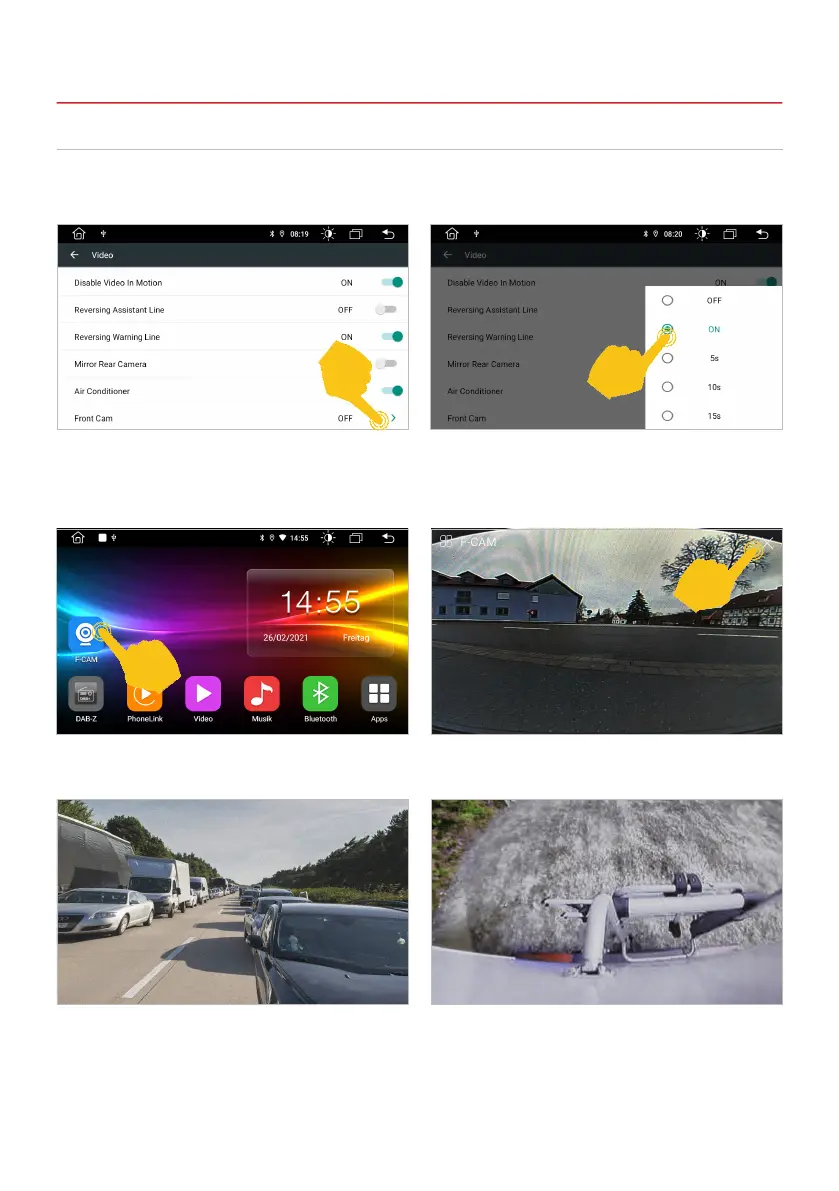
If you have connected a compatible additional camera to the additional camera input of the device, this
will be displayed via the F-CAM app. This view is also shown when pressing the camera direct button
twice (refer to page 6), if the additional camera has been activated before.
If a time selection is made here instead of ON,
e.g. 5s, the application closes automatically after
5 seconds and the main screen is shown again.
Tap on F-CAM in the app menu to open the
additional camera view.
Under Settings, open the Car Settings menu, then
tap on Video. Activate the corresponding input
under Front Cam.
Alternatively, you can also connect a double-lens
reversing camera with far vision, which you can
then use as a rear-view mirror camera via the
F-CAM app.
To exit the view, tap the white X in the top right
corner.
As soon as you engage reverse gear, the close-up
view of the rear-view camera is activated again.



 To Next Page