6
1. BRIEF OVERVIEW
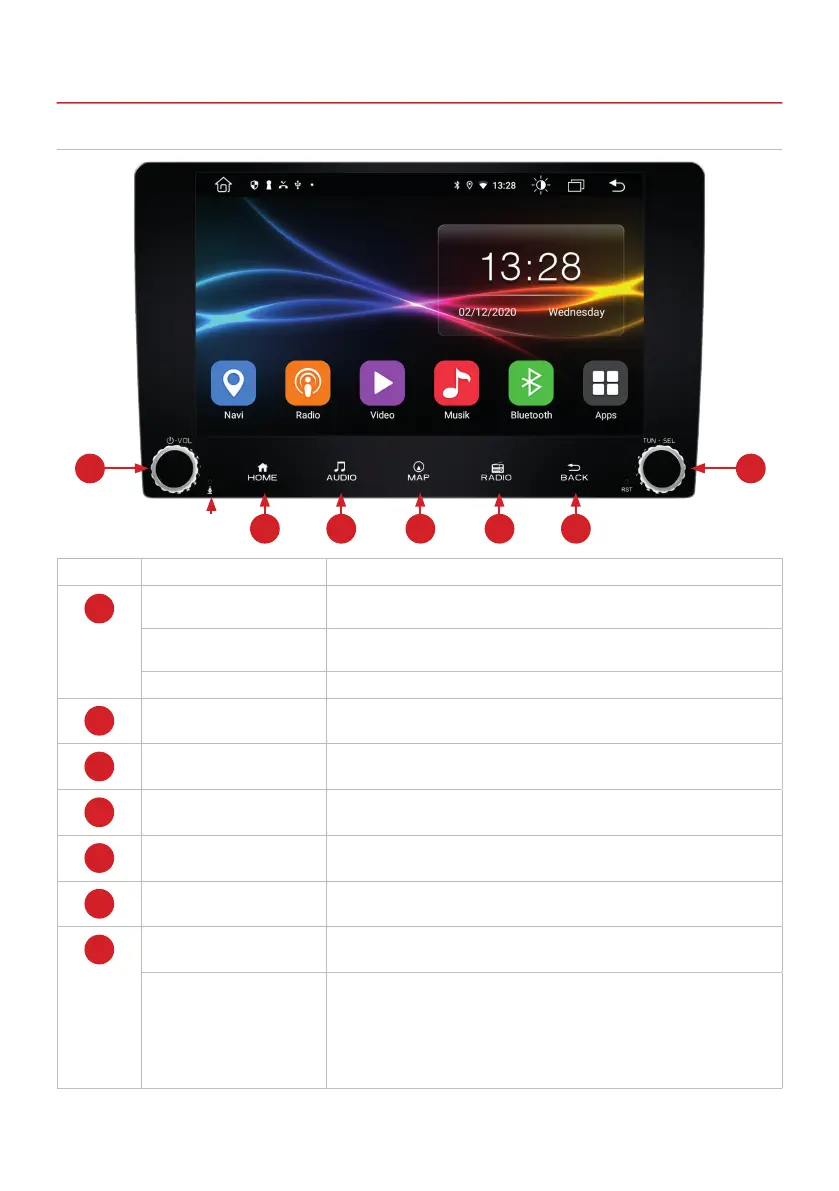
1.1 FUNCTION KEYS
Number Function Description
1
Switching on or off
with or without ignition
Press and hold the button for more than 3 seconds to turn the device
on or off without ignition.
Mute Press the button briey during operation to switch the mute function
on or off.
Volume Turn the control to adjust the volume.
2
Main menu Press here to open the main menu.
3
Audio settings Press here to open the audio settings.
4
Navigation Press to launch the linked navigation application.
5
Radio FM/AM Press to launch the FM / AM radio application.
6
Back Press here to go to the previous opened menu.
7
Set the radio frequency Turn the control to set the frequency within the Radio / DAB + menu.
Camera direct button Press here to open the view of the connected rear view camera. Press
again to exit.
How it works with a connected additional camera: Press here twice to
open the view of the connected additional camera (see page 21). By
pressing the HOME button on the device, you return to the main menu
in the additional camera view.
-
1 7
2 3 4 5 6
Internal
microphone



 To Next Page