25
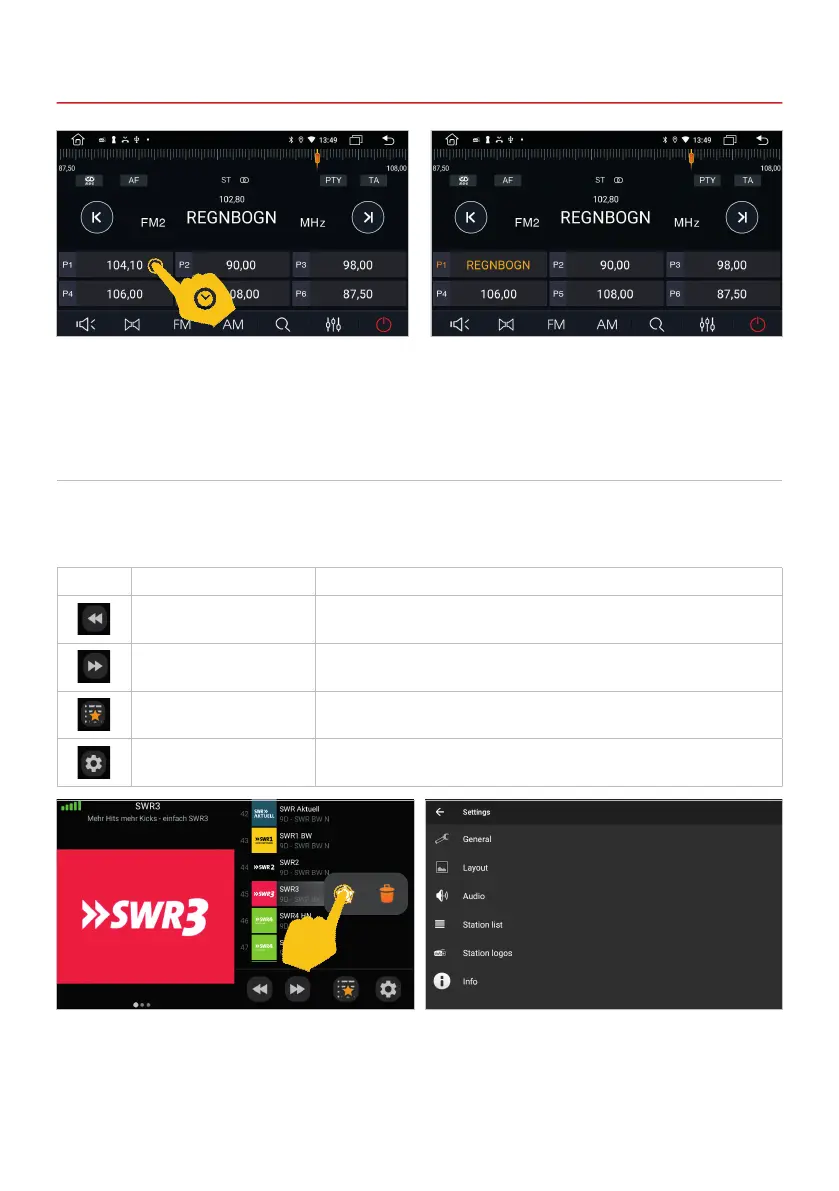
To save a station in the favorites, press for one
second on the desired position.
To save a station in the favorites, press the station
name in the list for a second and select the star.
To delete the station from the favorites list, select
the trash can.
In the settings, for example, you can start a station
search for all stations that can be received in the
reception area under station list.
The station is now in the favorites list.
3. INFOTAINMENT
Symbol Function Description
Next station down Tap here to search for the next strong and clear station frequency band
downwards.
Next station down up Tap here to search for the next strong and clear station frequency band
upwards.
Favorite list / channel list Tap here to switch between the favorites list and the channel list.
Settings Tap here to open the settings.
In the app menu tap on DAB-Z. When using the device for the rst time, you must rst start the station
search as requested. This process can take several minutes. All DAB+ stations displayed in the current
transmission area will then be displayed.
3.2 DAB+ RADIO



 To Next Page