U2836 Operation Manual Chapter 2 Introduction
6
2.2 Introduction to rear panel
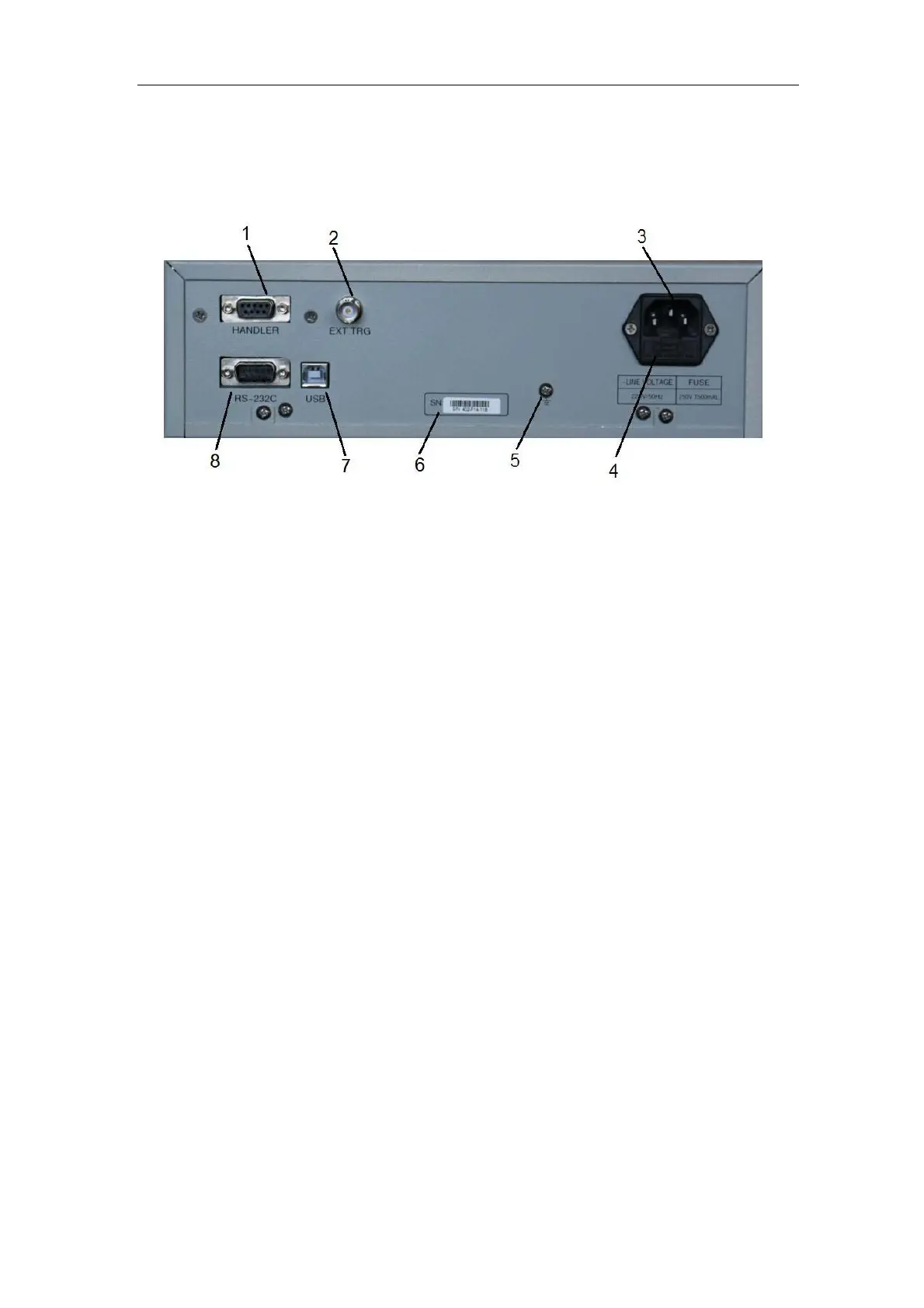
Figure 2-2 shows the rear panel of U2836.
1) HANDLER interface
Handler interface is used to realize the sorting output of test results.
2) External trigger interface
Handler interface is used to realize the sorting output of test results.
3) Power socket
Input AC power.
4) Fuse base
Being used to install power fuse, protect instrument.
———————————————————————————————————————
Warning: Be sure that the direction of fuse is accordant with
power-supply voltage range before charging.
———————————————————————————————————————
5) Ground terminal
The ground terminal is connected with instrument casing, being available for
protecting or shielding ground connection.
6) Serial number
Information about production date, instrument number and manufacturer
etc..
7) USB DEVICE interface
The tester can communicate with PC through the USB DEVICE interface.
8) RS232 interface
Series communication interface can realize the communication with PC.


 To Next Page