U2836 Operation Manual Chapter 3 Introduction to [MEAS DISP]
17
3.3 <MEAS SETUP>
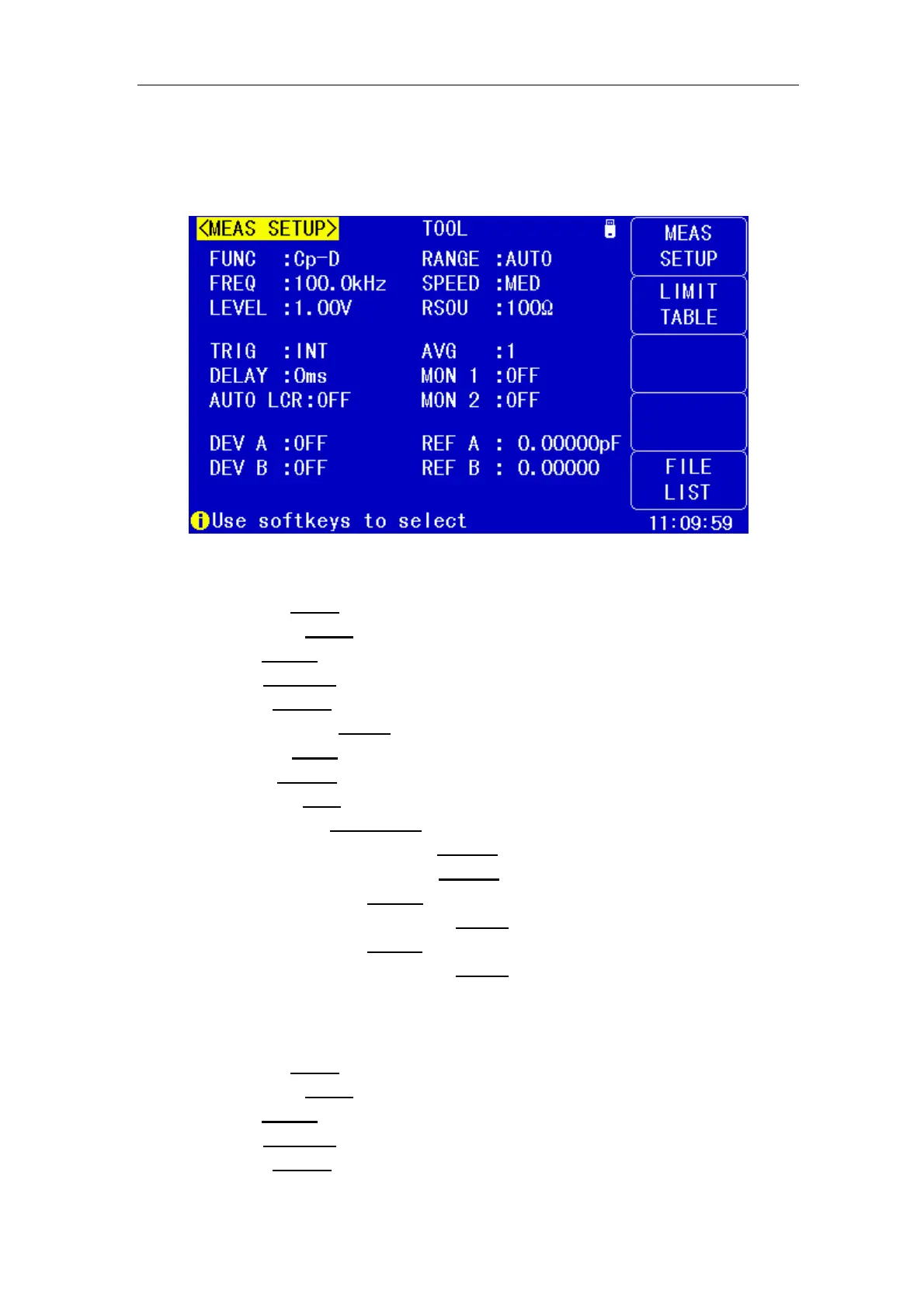
Press [ SETUP] to enter into the <MEAS SETUP> page shown as below:
In this page, the following control parameters can be set. (Items in parenthesis
can be set)
Test function (FUNC)
Test frequency (FREQ
)
Test level (LEVEL
)
Tes t range (RANGE
)
Test speed (SPEED
)
Output Impedance (RSOU
)
Trigger Mode (TRIG
)
Delay Time (DELAY
)
Average times (AVG
)
Auto LCR Function(AUTO LCR
)
Voltage Level Monitor ON/ OFF (MON 1
)
Current Level Monitor ON/ OFF (MON 2
)
Deviation Test Mode A (DEV A
)
Deviation Test Reference Value A (REF A
)
Deviation Test Mode B (DEV B
)
Deviation Test Reference Value B (REF B
)
Some zones listed below are as same as that on <MEAS DISP> page, so it is not
necessary to introduce in this section, but others will be introduced briefly in the
following sections.
Test function (FUNC
)
Test frequency (FREQ
)
Test level (LEVEL
)
Tes t range (RANGE
)
Test speed (SPEED
)


 To Next Page