U2836 Operation Manual Chapter 4 System and FILE
30
Chapter 4 SYSTEM and FILE
4.1 <SYSTEM>
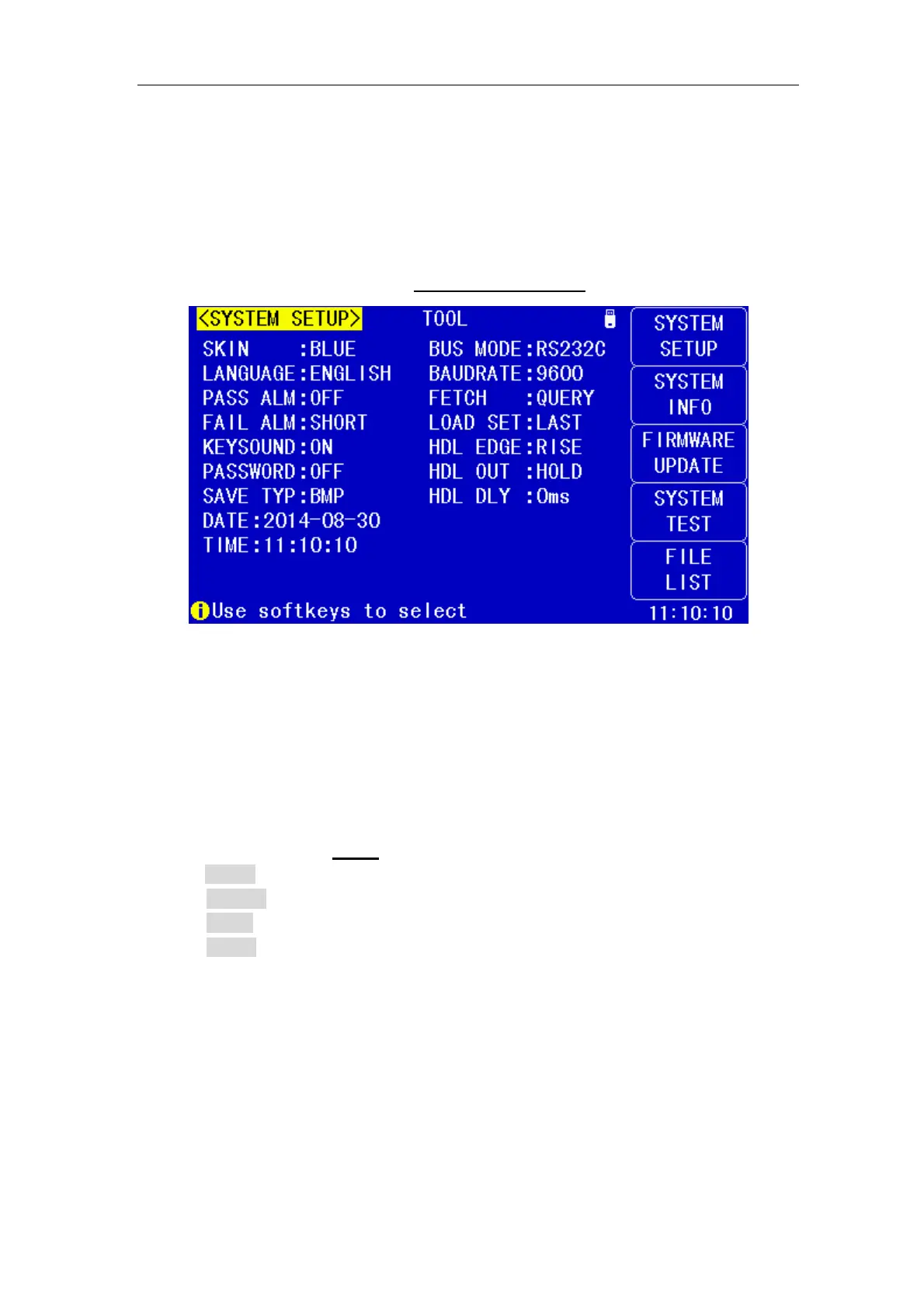
Press [System] to enter into the <SYSTEM SETUP> page shown as below.
On this page, most system setup items are displayed, such as instrument
skin,language, PASS alarm, FAIL alarm, password, bus mode, GPIB address,
baud rate, data/time.
4.1.1 SKIN
The function of this zone is to set the theme of display.
Operation steps for setting the theme of display
1) Move the cursor to SKIN
, the following soft keys will be displayed.
GRAY
BLACK
BLUE
CYAN
2) Use above soft keys to select the theme of dispaly.
4.1.2 LANGUAGE
This zone is used to control and display the current language mode of the
operating instrument.
Operation steps for setting language
1) Move the cursor to Language, the following soft keys will be displayed.
English


 To Next Page