U2836 Operation Manual Chapter 3 Introduction to [MEAS DISP]
26
3.5.2 Limit modes of compare function
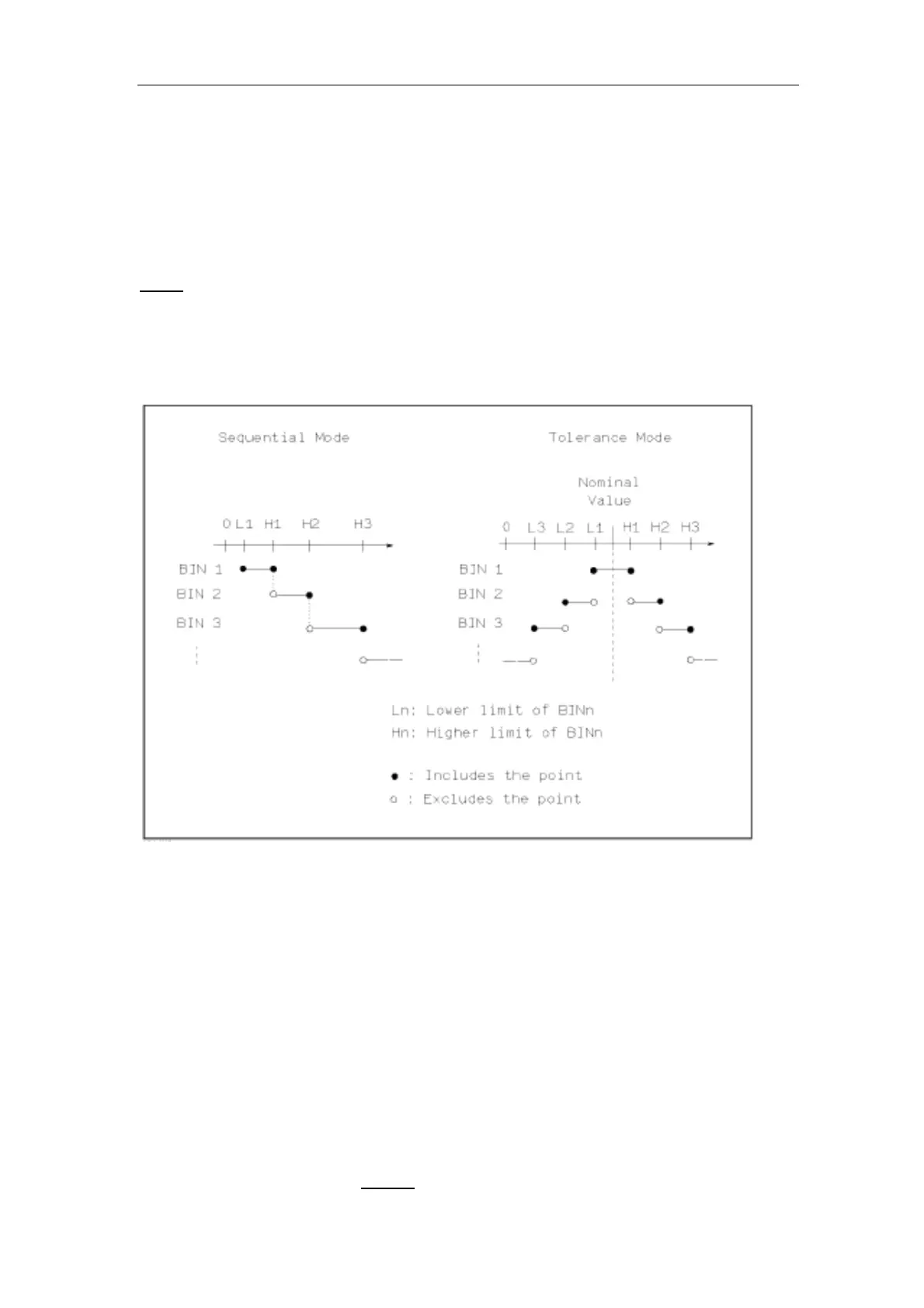
Compare functions has two limit setup modes for primary parameters as shown in
figure 3-3.
Tolerance mode
Under tolerance mode, set the deviation value of the nominal one (be set in the
NOM
zone) as the compare limit value. Deviation value has two modes:
percentage deviation and absolute deviation.
Sequential mode
Under sequential mode, the range of the test value is the compare limit value.
The compare limit value should be set in the order from small to large.
Figure 3-3 Tolerance mode and Sequential mode
———————————————————————————————————————
Note: When setting limit values of tolerance mode, the error range should be set
in the order from small to large. If the error range of BIN1 is the largest one, then
all DUT will sort into BIN 1.
Under tolerance mode, the low limit is not necessary to be smaller than the
nominal value and the high limit is not necessary to be larger than the nominal
value. The limit range of each bin can be discontinues or overlapped.
———————————————————————————————————————
Operation steps for setting the limit mode of the compare function
1) Move the cursor to the MODE
zone, the following soft keys will be displayed.


 To Next Page