U2836 Operation Manual Chapter 2 Introduction
7
2.3 Introduction to display zone
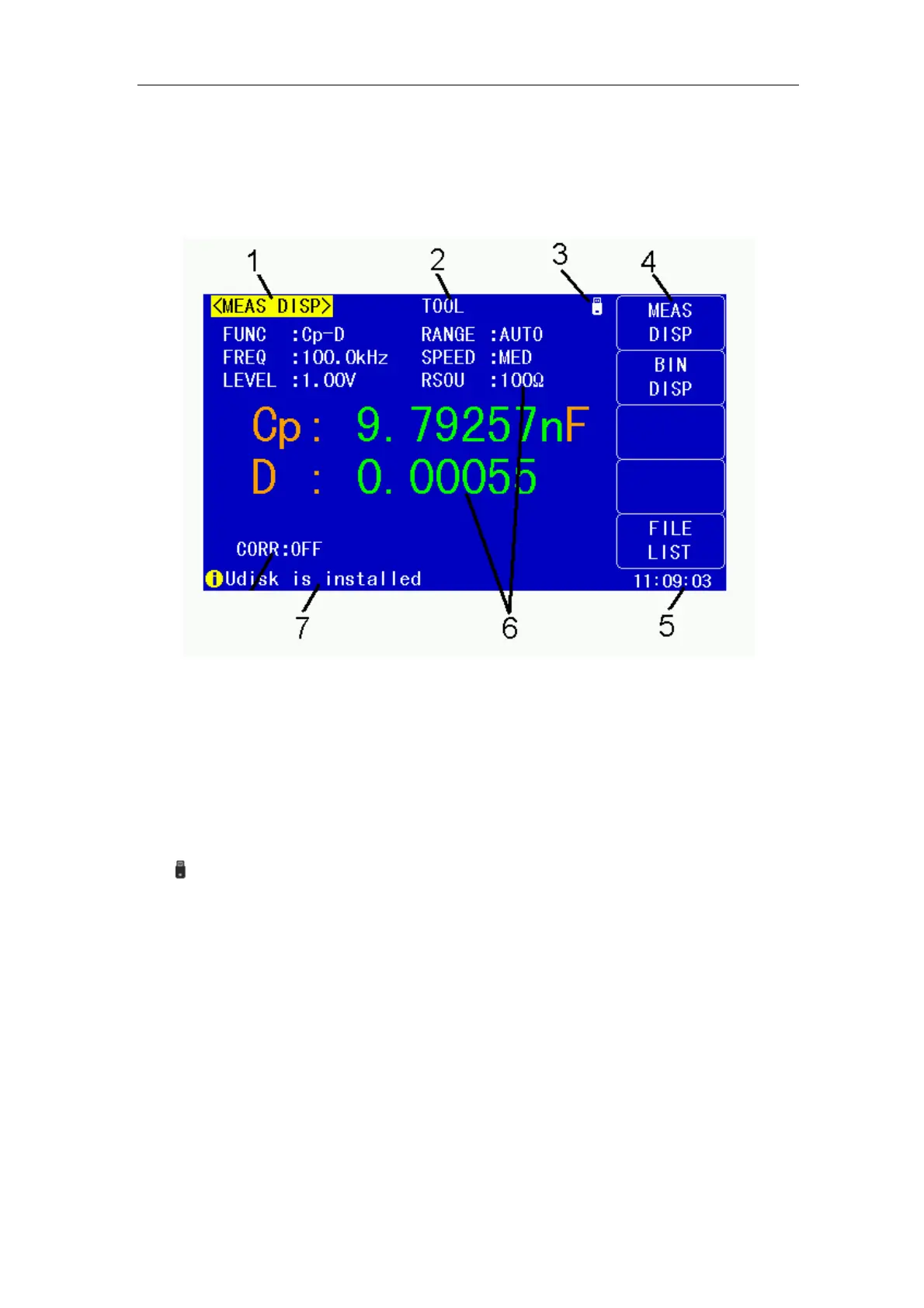
U2836 applies a 65k, 4.3-inch TFT display. The display screen is divided into the
following zones:
Figure 2-3 display zones
1) Display page name
Indicate the name of the currently displayed page.
2) Tools menu
When the cursor moved the area, the softkey area will display the
corresponding specific tools.
3) System icon zone
In this zone, display the system status:
U disk is connected
Romot control status.
± Keyboard locked.
§ Data recording status.
4) Soft keys
The zone is used to display the function definition of soft key. The definition of
soft key can be different as the difference of cursor’s direction in the zone.
5) Time
Display the current time.
6) Test result/ condition display zone
In this zone, test result information and current condition are displayed.
7) Help
In this zone, information about system and user data input is displayed.


 To Next Page