EVER UPS SINLINE RT / RT XL series instruction manual
Pomoc Techniczna, tel.: +48 61 6500 400
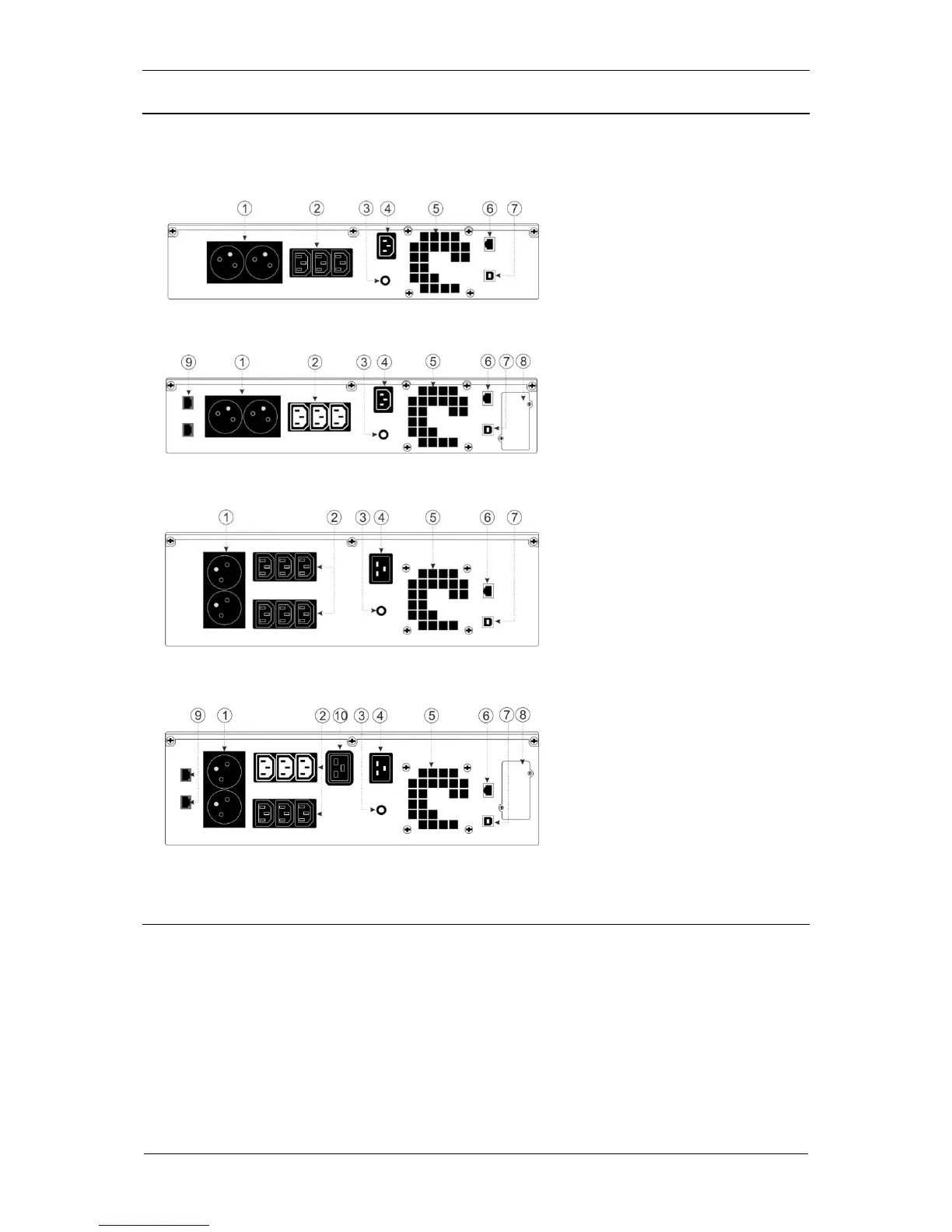
ELEMENTS OF THE UPS - REAR PANEL
Figures 1 - 4 present the elements found in rear panels of SINLINE RT / SINLINE RT
XL units.
1. Output sockets
PN-E-93201 (10 A)
2. Output sockets
IEC 320 C13 (10 A):
white - controlled
black - non-controlled
3. Automatic fuse
4. Mains input:
IEC 320 C14 (10 A)
SINLINE RT 1000 – 1200
SINLINE RT XL 650 - 850
IEC 320 C20 (16 A)
SINLINE RT 1600 – 3000
SINLINE RT XL 1250 – 3000
5. Fan
6. Ethernet communication port
7. USB communication port
8. Expansion card compartment
9. Telecommunication filter
10. Output socket
IEC 320 C19 (16 A)
Fig. 1: View of the rear panel of SINLINE RT 1000 - 1200
Fig. 2: View of the rear panel of SINLINE RT XL 650 - 850
Fig. 3: View of the rear panel of SINLINE RT 1600 - 3000
Fig. 4: View of the rear panel of SINLINE RT XL 1250 - 3000
HOW IT WORKS
The PSU unit comes with a graphic LCD display with three, multi-function buttons
and a signal LED. Figure 7 shows the elements of the front panel of SINLINE RT /
SINLINE RT XL units and the description of such elements. Table 1 presents the
description of the buttons of the control panel and Table 2 presents the description of
sound and visual signals informing about the PSU's various operating modes.



 To Next Page