EasyManua.ls Logo

Ever SINLINE RT - Lcd Display Icons

Ever SINLINE RT
75 pages
Print Icon
To Next Page IconTo Next Page
To Previous Page IconTo Previous Page
Loading...
EVER UPS SINLINE RT / RT XL series instruction manual
2017-04-26 12:41
Pomoc Techniczna, tel.: +48 61 6500 400
www.ever.eu
16
Event
Sound signal
Visual signal
Enforced switching to
STANDBY mode (from
BACK-UP mode)
Red LED pulsating with sound alarm in sequences: dual visual and sound signal / 2.5
s pause. The sound signal is on only if the MUTE function is inactive.
Waiting to reach
minimum load
No sound signal
Green LED pulsating (100 ms ON / 5
s OFF).
Overload
Continuous signal
No visual signal.
Overheating
Continuous signal
No visual signal.
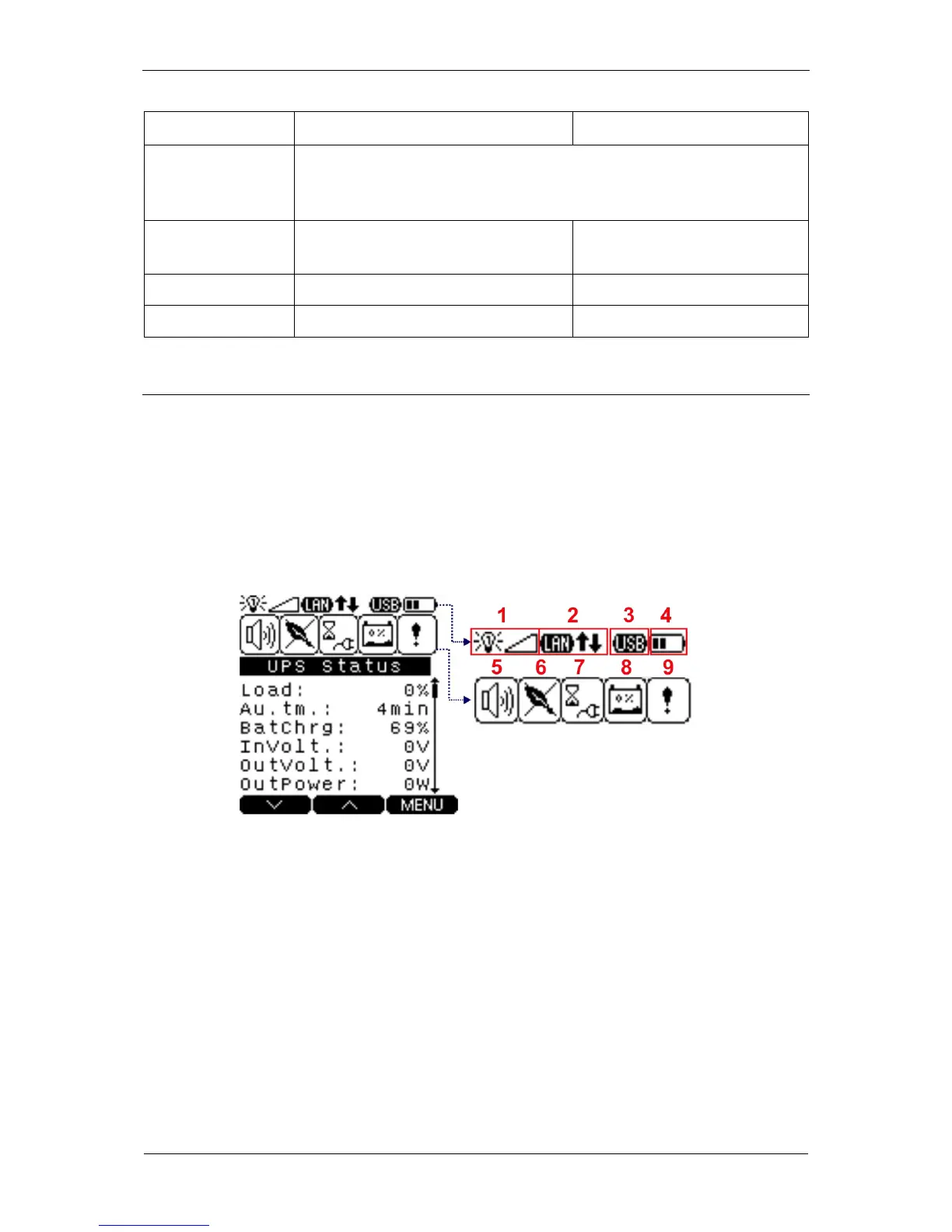
LCD DISPLAY ICONS
The front panel of the UPS unit presents useful information concerning the current
functional state of the UPS unit: the operation mode, input and output parameters
values, load level, alarms and messages.
Figure 6 shows the display. Table 3 presents the description of information icons that
may be shown on the LCD display depending on the UPS unit's operating mode.
Fig. 6: LCD display screen with information icons


Table of Contents

Related product manuals