TR-4800E
Tally Router
Page - 16 Revision 1.1
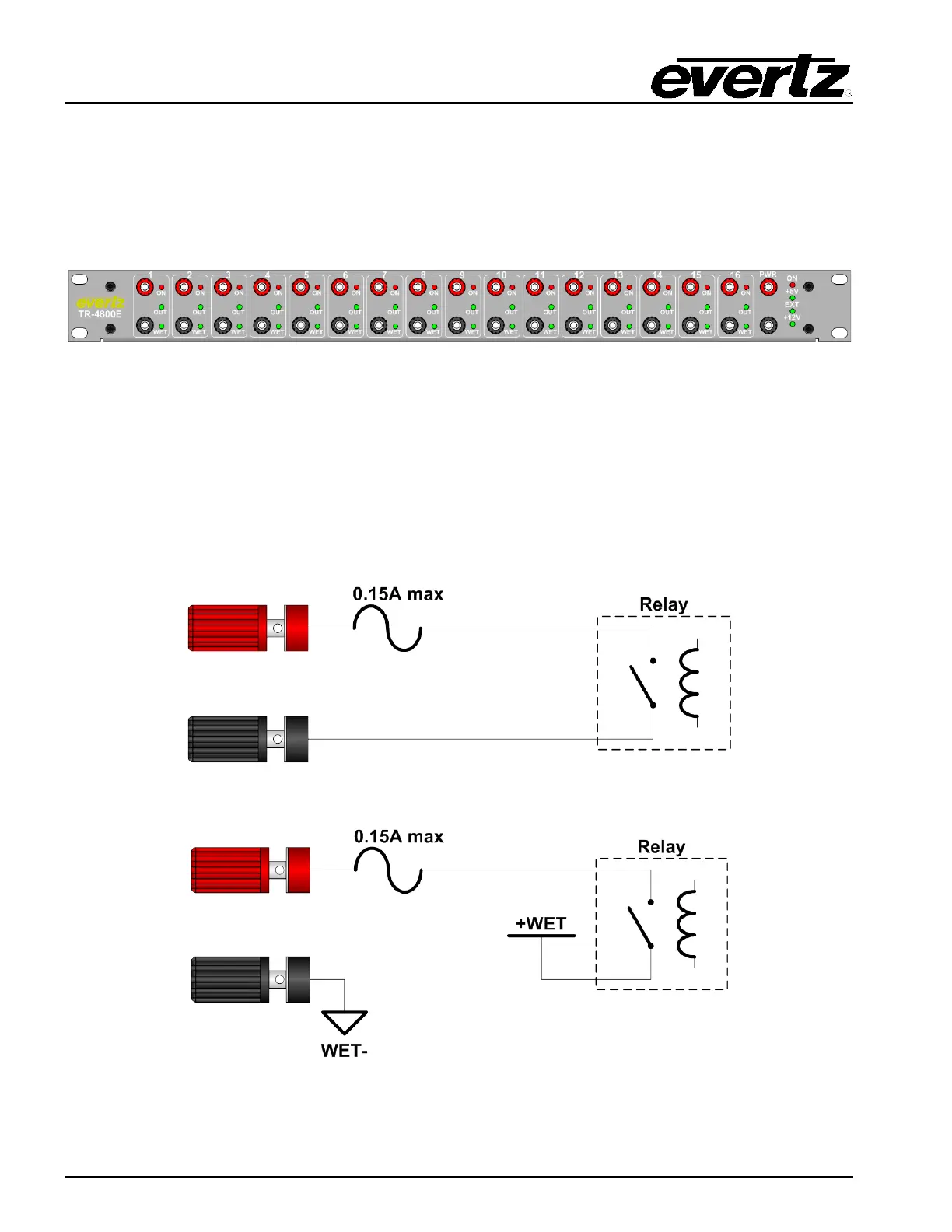
3.8 FRONT PANEL BINDING POSTS OPTION (+BP16)
If the TR-4800E is ordered with the +BP16 option, there will be an additional 16 General Purpose I/O
(GPIO) channels available on the front panel on standard banana plug binding post connectors. These
are called GPIO as they are software-selectable between input (GPI) and output (GPO) modes. The
Wet Power binding posts are moved from the rear of the unit to the front panel.
Figure 2-5: Front Panel with +BP16 Option
3.8.1 Binding Post Outputs
When a GPIO channel has been configured as a GPO, the respective “OUT” LED will illuminate. The
GPO can be switched between Wet and Dry modes (see section 2.7.1). When the GPO is in Wet
mode the “WET” LED will illuminate. In Wet mode the black binding post will be connected to WET-.
The red binding post will be open when the GPO is off, and connected to WET+ when the GPO is
turned on. When the GPO is in Dry mode the “WET” LED will turn off and there will be a simple relay
contact closure between the red and black binding posts. The “ON” LED will illuminate Red whenever
the GPO is in the on state.
Figure 2-6: Front GPIO Channel in Dry GPO Mode Circuit Diagram
Figure 2-7: Front GPIO Channel in Wet GPO Mode Circuit Diagram



 To Next Page