2-5-2 Communication Protocol Setting
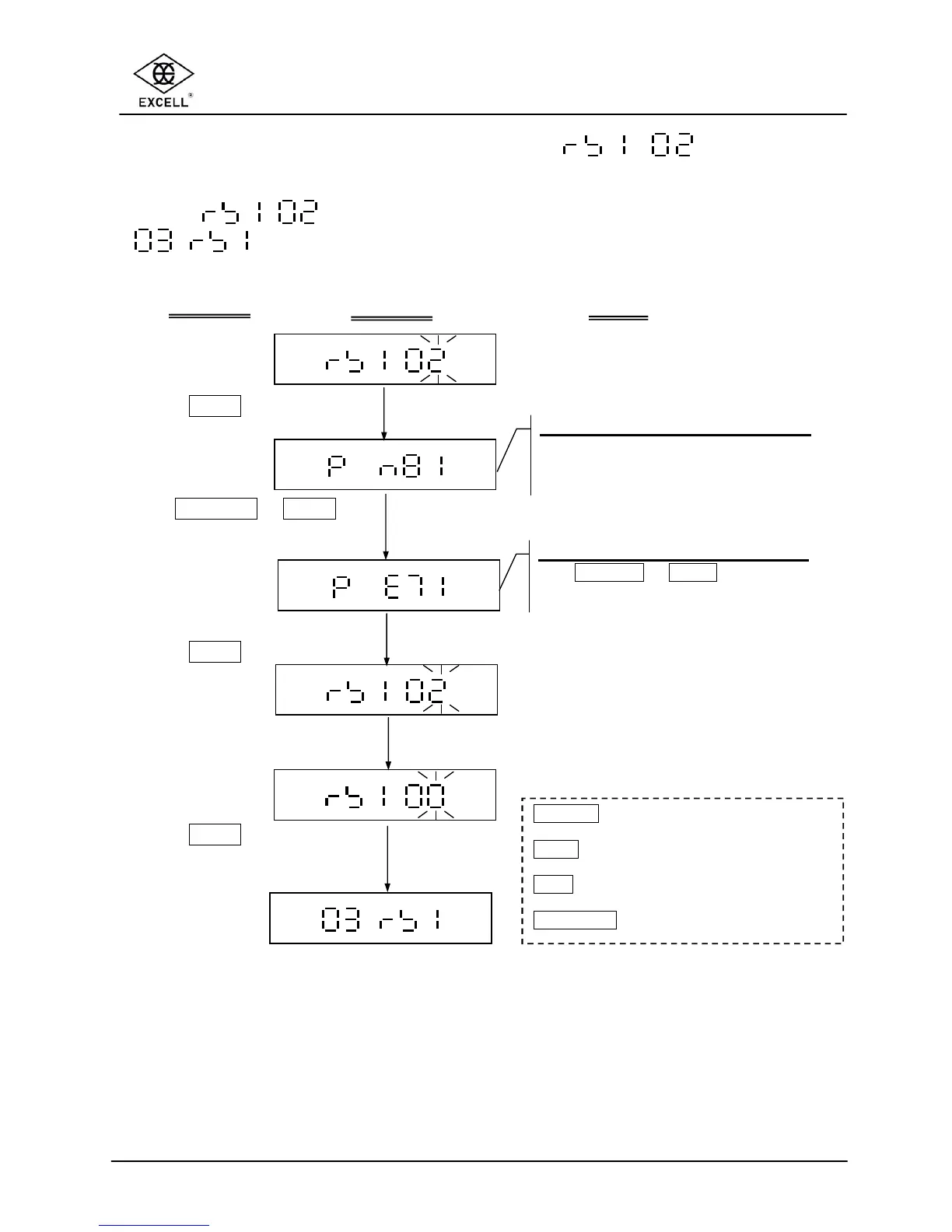
Select in the RS232 serial interface setting mode
to set the Communication Protocol.
Communication protocol setting
LCD shows the last setting value.
4 Default setting: n 8 1
Communication protocol setting
Use
ON/ZERO
or
UNITS
keys to select
the protocol setting: n 8 1, E 7 1, O 7 1
Press
TARE
key
Use
ON/ZERO
or
UNITS
key to select the protocol
setting
Press
TARE
key
Key in the parameter “00”
Press
TARE
key to exit
RS232 serial interface
settings
ACTIONS
DISPLAY
NOTE
ON/ZERO
key
Upward key (from 0 to 9)
UNITS
key ⇒ Downward key (from 9 to 0)
TARE
key ⇒ Move the cursor to right
NET/GROSS
key ⇒ Move the cursor to left.



 To Next Page