EXCELL PRECISION CO., LTD
SI-132 v1.1 SME300000081
6
.
.
.
.
.
.
.
.
.
.
Pcs
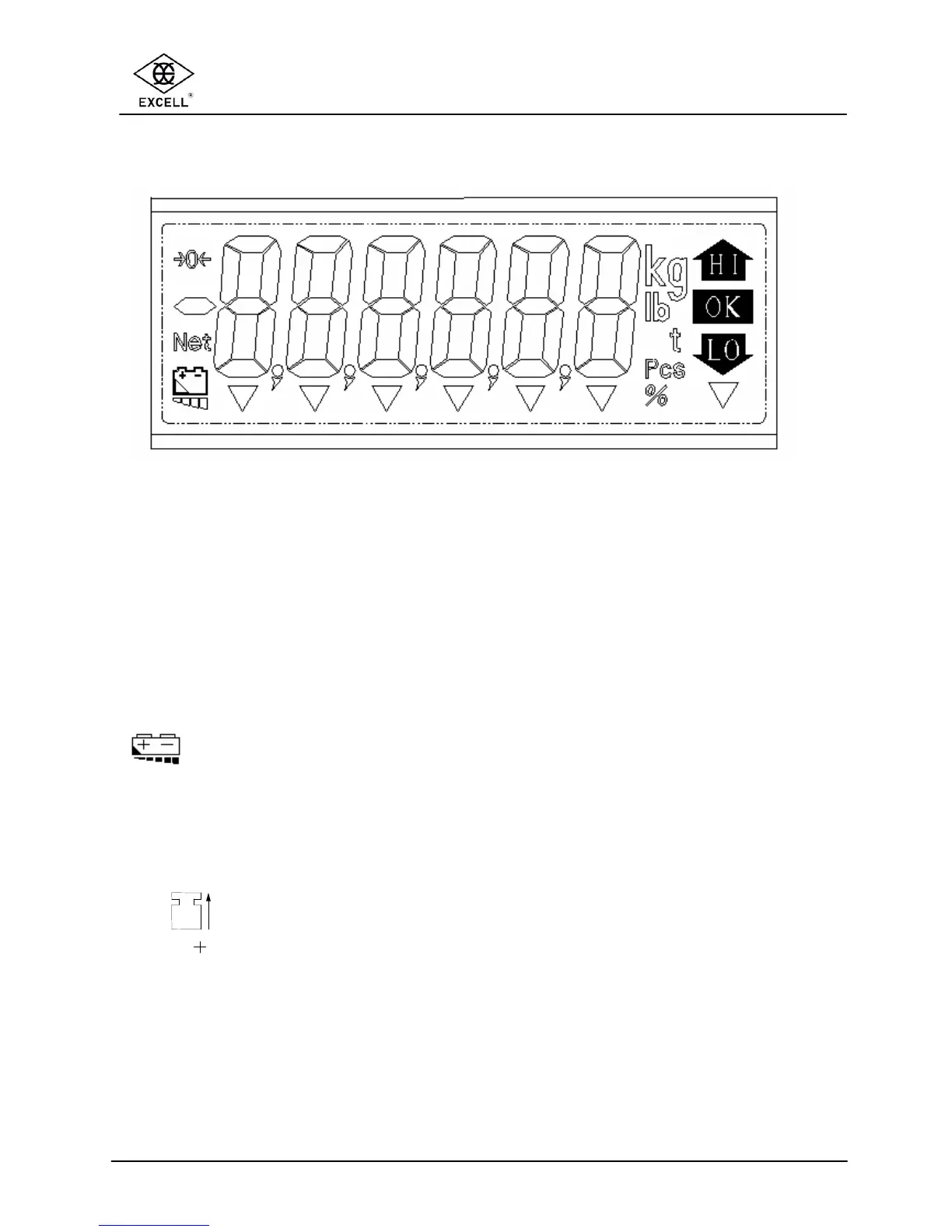
1-4 DISPLAY
1 2 3 4 5 6 7
HI : The weight on weigh pan is greater than the high limit
OK : The weight on weigh pan is equal to the OK limit
LO : The weight on weigh pan is lower than the check value
kg : kg units. When “kg” is displayed, it means the weight shown is in kg
lb : Pound units. When “lb” is displayed, it means the weight shown is lb
Pcs : Piece units. When “Pcs” is displayed, it means the scale is in “sampling
and counting” mode
à0ß :
Zero status indication, when displayed the scale is at the centre of its zero
band
Net : The display shows the goods weight, not including the weight of any
container. This Net status indication is on when the TARE function is used
: Battery status indication. When this symbol is flashing replace the
batteries.
61
STABLE
: The weight is stable.
62
GROSS
: The scale is in the gross mode. The display shows the goods and any
container weight. This Gross status indication is on when the TARE
function is used.
63 : The unit weight is not sufficient. When the icon is on, the counting
function is operational but the count may contain errors.
64
: The sampling size is not sufficient When the icon is on, the counting
function is operational but the count may contain errors.
65
Hold
: The Hold function is in use.
66
: “GN”, “dwt”, or “carat” units. The actual unit depends on the model of the
scale.
67
oz
: ounce unit. When “oz” is on, it means the scale is weighing in ounces



 To Next Page