Section 924
ASPEN EFD1000 PILOT PFD
924 - 8 Page Date: 31. March 2009
Pilot´s Operating Handbook
EXTRA 300L
Indicated Airspeed Bug Set
To set the indicated airspeed bug, repeatedly PUSH the left control knob until the IAS field is
enabled for editing. ROTATE the knob to the desired setting.
924.7.7 KNOB SYNC FUNCTION
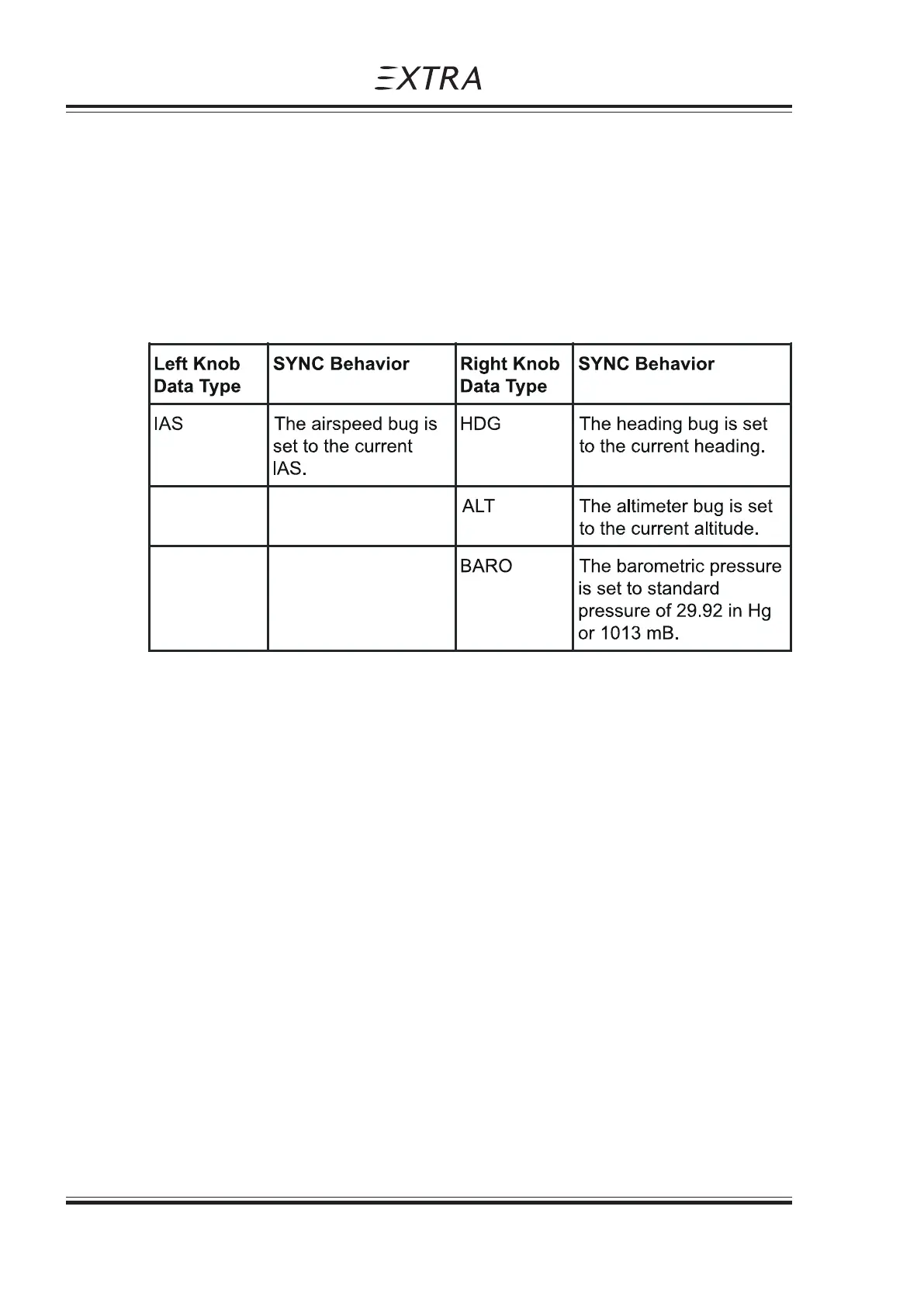
Editable fields may be synchronized as a function of data type as described in Table 1 below.
Whenever a control knob is held for approximately one second the active data type will be „sync’d“
as follows:
Table 1 - Knob „Sync“ Operation
924.7.8 HOT KEY OPERATION
During normal operations, the five line select soft-keys on the lower right side of the display bezel
are referred to as „Hot Keys.“ Hot Keys provide single-action access to frequently used functions.
An electronic legend adjacent to each Hot Key indicates its hot key function. When the legend is
green, the function is active. When it is gray, the function is inactive. The legend always annunciates
the current state.
TAPES
Hot Key 1 enables/disables the display of the airspeed and altitude tapes.
MINIMUMS
Hot Key 2 enables/disables the display of the Minimums.



 To Next Page