AM-JACKAL-35 / JULY 2020
BATCH (SOLENOID)
KIT # 1501
The Batch function is designed to measure bulk water into a spray
tank via either a bottom or top fill system. The minimum flow
rate for effective operation is 75 L/min to a maximum of
750L/min using our standard 2” flow sensor.
Water may be pumped, or gravity fed through the flow sensor,
which will give accurate readings providing no air enters the
system. The Flow sensor can be installed on either the suction or
pressure side of the water delivery system, and the readout will
count up to display the total litres delivered.
Alternatively, the TANK BATCHMETER may be automated by installing either the SOLENOID SHUTOFF option which
will automatically stop the flow after the readout counts down to zero from a preset batch total.
When using the Jackal as a batch meter with liquid, please ensure the appropriate flow meter is setup as per the
previous instructions.
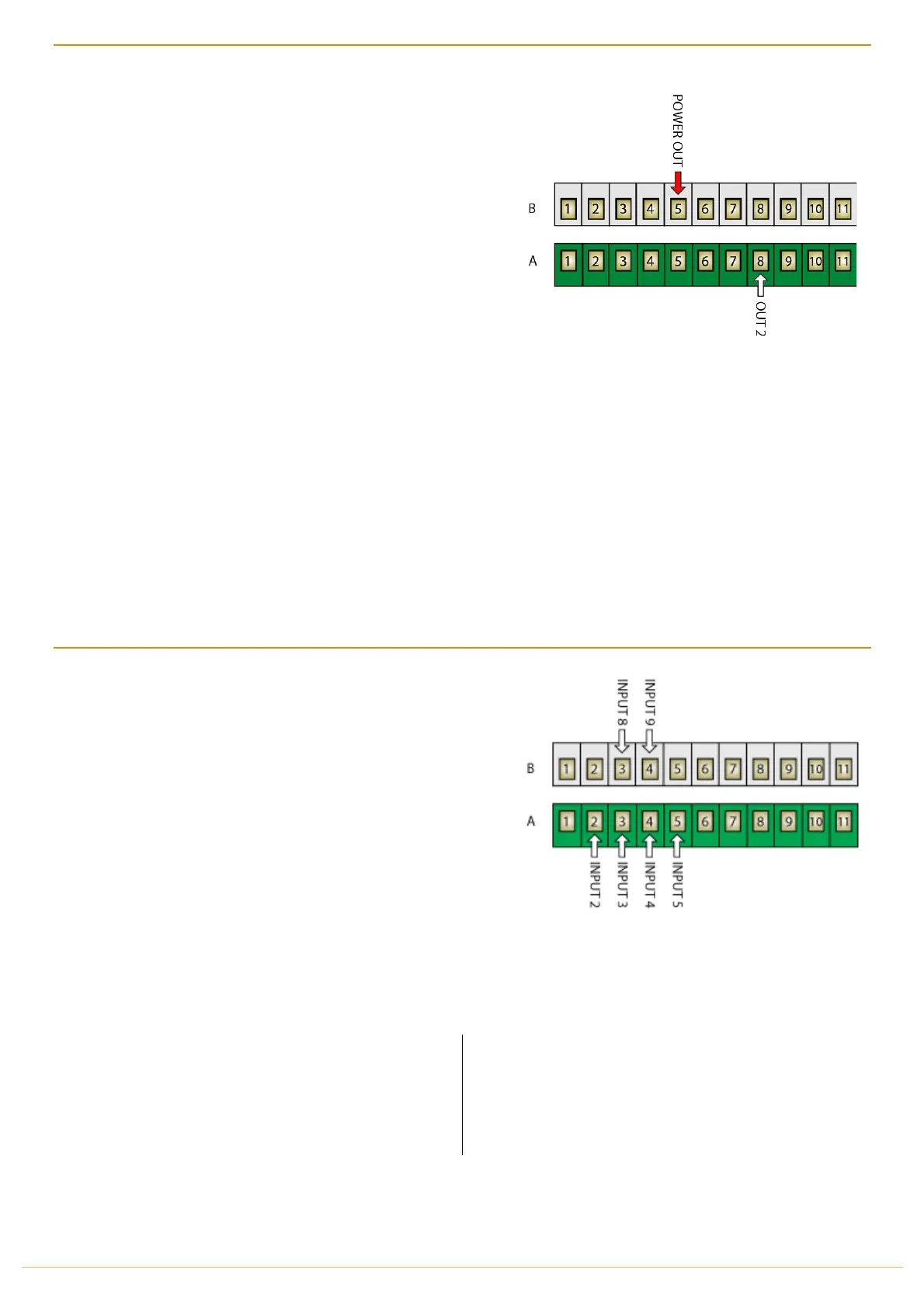
Insert one wire to (B5 POWER OUT) and the other wire into (A8 OUT 2)
Use the wizard & instructions to setup the port and calibrate once installed.
If water quality is doubtful, water intake should be filtered via an 80-mesh filter before the flow sensor, to avoid foreign
matter clogging / jamming the turbine. Chemicals may be introduced into the water stream without causing damage
to the flow sensor, but some chemicals may damage or reduce the solenoid diaphragm life, particularly if undiluted.
REMOTE RUN/HOLD (ACTIVATE BY INPUT)
The Jackal can connect an external Run/Hold trigger (e.g.
Remote Switch) & wire into any unused signal INPUT port
(A2-A6 & B3-B4)
This allows the Jackal to be remotely placed on hold or run
mode from an external source or switch without having to press
the Run/Hold button on the Jackal itself. When the external
Run/Hold is active on the mentioned inputs the Run/Hold
button on the Jackal is then disabled.
Insert the ground wire from your external switch to any of the
unused ports as mentioned above.
NB: In some cases, you may have to use an automotive relay to provide the appropriate ground output.
NORMALLY ON
WHEN A CIRCUIT EXISTS BETWEEN THE SELECTED
INPUT AND GROUND (GND), SELECTING NORMALLY ON
WILL RESULT IN THE JACKAL GOING INTO HOLD MODE
NORMALLY OFF
SELECTING NORMALLY OFF WILL RESULT IN THE
REVERSE I.E. THE JACKAL WILL BE IN RUN MODE UNTIL
THE CIRCUIT IS BROKEN AFTER WHICH IT WILL GO INTO
HOLD MODE.
Enable the remote run/hold via OTHER SETTINGS as further described on PAGE 44.



 To Next Page